
Docx Reader - Office Viewer
▶️ Google PlayProductivityFreeIn-App PurchasesContains AdsEveryone
4.3★
189.4K reviews
50.0M
Installs
Dec 23, 20
Released
2025-12-15
Last Updated
Rankings
| Category | Collection | Rank | Date |
|---|---|---|---|
| PRODUCTIVITY | topselling_free | #148 | 2026-03-10 |
Screenshots



About Docx Reader - Office Viewer
All-in-one Word Office and PDF editing app makes it easy to edit PDFs, view, and manage all files!
DOCX Reader & PDF Editor supports ultra-fast reading of files in all formats, fully compatible with Word, PDF, Excel, PPT, TXT, etc. With it, you can read documents and edit PDFs offline, anytime, anywhere — work is no longer confined to the office!
Try this free and simple document reader and PDF editor now to seamlessly work across devices, even without Internet!
📚 BASIC FEATURES OF DOCX VIEWER & PDF EDITOR
Support All Formats: Word, PDF, Excel, PPT, TXT, XLSX, DOCX, PPTX, etc.
PDF Editing: Effortlessly edit PDF files with powerful editing tools
Quick Search: Easy search options to quickly find the target file
Add to Favorites: Favorite any document for quick access
Easy Management: Freely rename, delete, or share your documents
Offline Available: No internet is required
File Sorting: Sort all files by time, size, and name
🙋 What can full-featured DOCX Viewer & PDF Editor do?
#PDF Editor & PDF Reader Features:
- Read & edit seamlessly: Quickly open, edit, share, and print PDF files
- Edit as you like: Underline, strikethrough and highlight text on PDF pages
- Edit with ease: Copy any text from a PDF file with ease
- Edit freely: Draw freely on PDFs and remove your marks as needed
- Edit with annotations: Add notes for further reference (coming soon)
- Easy-to-use editor: Rotate PDF, go to desired pages with one click
#Word Reader & Word Editor Features:
- Fast open and read all DOC, DOCX, DOT, DOTX, DOTM files
- High-quality preview of resumes, cover letters, notes, etc.
- Zoom in and out of pages to improve reading experience
- Present all pages by thumbnails, go directly to the desired page by clicking thumbnails
- Adjustable reading mode: horizontal or vertical; page by page or continuous pages
- Highlight, underline, strikethrough and copy any text in documents
#Excel Reader Features:
- Support XLS, XLSX, XLT, XLTX, XLTM, XLSM files
- Work on the go: view all spreadsheets anytime, anywhere, even offline
- Select cells and locate data quickly
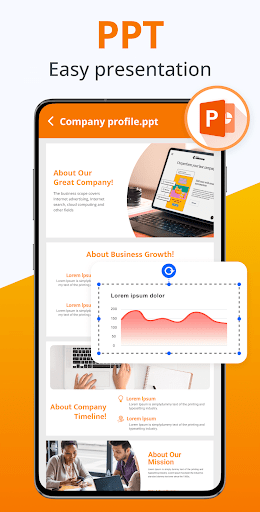
#PPT Viewer Features:
- PPT, PPTX, POT, PPTM, POTX, POTM formats, all supported
- Make PPT presentations easier than ever
- High resolution, fast and stable performance
#Text Viewer Features:
- Easy to view text files
- Read e-books offline
🧐 Why is DOCX Viewer & PDF Editor outstanding?
✓ Simple reader with a professional reading experience
✓ Easy-to-use PDF tools for hassle-free PDF editing
✓ Centrally manage all files in one place
✓ Lightweight, fast response
✓ User-friendly UI, simple and elegant reading interface
🔜 COMING SOON
► Create new documents
► Add text with custom size and color
► Add e-signatures and watermarks on PDFs
► Merge and split PDF files
► Dark mode
► Search text in the documents
► Scan documents
► More formats such as RAR, MOBI, HTML, ODT, XML, DOT, ZIP
► Collabo
Frequently Asked Questions
Is Docx Reader - Office Viewer free?
Yes, Docx Reader - Office Viewer is free to download. It offers in-app purchases.
What is the rating of Docx Reader - Office Viewer?
Docx Reader - Office Viewer has a 4.3 out of 5 star rating based on 189.4K reviews on the Google Play.
Who made Docx Reader - Office Viewer?
Docx Reader - Office Viewer was developed by QR & Barcode Scanner. Visit their website at https://lippu.ltd.







