4.4★
28 reviews
500
Installs
Jun 17, 20
Released
2025-07-31
Last Updated
Rankings
| Category | Collection | Rank | Date |
|---|---|---|---|
| PERSONALIZATION | topselling_paid | #178 | 2026-03-10 |
Screenshots


About Aquarium Live WatchFaces ULTRA
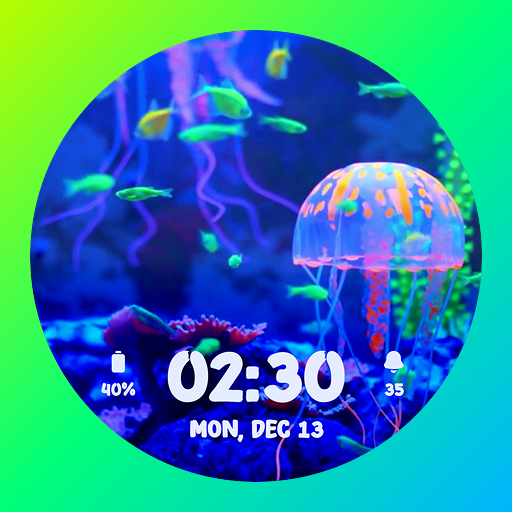
Bring your Wear OS watch to life with animated Aquarium Live Watchfaces!
Enjoy stunning underwater scenes with the Aquarium Live Watchfaces ULTRA app. It offers you beautiful aquarium fish-designed analog and digital watch face dials. Each dial features live fish and aquarium animations. This is perfect for nature lovers and those who want a splash of tranquility on their wrists.
Key Features:
🌊 Live Animated Aquarium Watch Faces
- Watch lively fish swim across your watch screen in real time.
🕰 Analog & Digital Dial Options
- Offers elegant analog and modern digital dial styles.
- It includes 5 analog & 5 digital dials.
- You can select the desired one and apply it.
⚫ Always-On Display (AOD) Support
- It offers you a sleek AOD layout for continuous timekeeping and staying time-informed.
🧭 Complications
- It gives you two complication options.
- You can select the desired complication from the list and set it.
- Tap for quick access to the complications.
- Below is the complications list:
Step Count
Day and date
Day of the week
Battery Percentage
World Clock
Weather Info
Sunrise & Sunset
Next Calendar Event
and More
⌚ Supports Wear OS 4 & above
- Fully compatible with the latest devices using Google's Watch Face Format.
- Compatible Devices List:
Samsung Galaxy Watch 4 / 4 Classic
Samsung Galaxy Watch 5 / 5 Pro
Samsung Galaxy Watch 6 / 6 Classic
Samsung Galaxy Watch 7 / 7 Ultra
Google Pixel Watch 3
Fossil Gen 6 Wellness Edition
Mobvoi TicWatch Pro 5 & newer models
How to Customize & Set Aquarium Animated Watch Face Dial:
- Tap and hold your watch face.
- Select “Customize” to select the dial and complication.
- In Complication, choose your desired to apply it for quick access.
- As customization is completed, swipe right or press the right top watch button (depending upon the watch).
How to Download Aquarium Live Watchfaces ULTRA:
📱 Via Mobile Companion App:
- Open the app on your phone and tap "Install" on your smartwatch.
- If the prompt doesn’t show, toggle Bluetooth or Wi-Fi off and back on.
⌚ From the Watch Play Store:
- Open the Play Store on your smartwatch.
- Search for "Aquarium Fish Live Watch Faces" and install directly.
Note:
- This is Wear OS Stand Alone app version.
- This app works with watches running Wear OS 4 and above versions and API level 33 and above. - It works on older smartwatches that were updated to Wear OS 5 through a software update.
- However, it supports newer watches that come with a higher version (the latest Wear OS 4 and above).
Frequently Asked Questions
Is Aquarium Live WatchFaces ULTRA free?
No, Aquarium Live WatchFaces ULTRA costs USD3.49.
What is the rating of Aquarium Live WatchFaces ULTRA?
Aquarium Live WatchFaces ULTRA has a 4.4 out of 5 star rating based on 28 reviews on the Google Play.
Who made Aquarium Live WatchFaces ULTRA?
Aquarium Live WatchFaces ULTRA was developed by MD Innovate. Visit their website at https://mdinnovate.blogspot.com.
Developer
Explore More
Related Personalization Apps







Share & Embed
Use these badges on your website or blog to link back to this app's data.
Rating Badge
<a href="https://apppricinglab.com/app/google_play/aquariumfishlivewatchface.underwaterwatchface.livefishwatchfaces.ultra"><img src="https://apppricinglab.com/api/badge/rating?store=google_play&app=aquariumfishlivewatchface.underwaterwatchface.livefishwatchfaces.ultra" alt="Aquarium Live WatchFaces ULTRA rating on App Pricing Lab" /></a>Rank Badge
<a href="https://apppricinglab.com/app/google_play/aquariumfishlivewatchface.underwaterwatchface.livefishwatchfaces.ultra"><img src="https://apppricinglab.com/api/badge/rank?store=google_play&app=aquariumfishlivewatchface.underwaterwatchface.livefishwatchfaces.ultra" alt="Aquarium Live WatchFaces ULTRA ranking on App Pricing Lab" /></a>