
3.0★
303 reviews
10.0K
Installs
Sep 3, 201
Released
2025-10-21
Last Updated
Rankings
| Category | Collection | Rank | Date |
|---|---|---|---|
| VIDEO_PLAYERS | topselling_paid | #37 | 2026-03-10 |
Screenshots
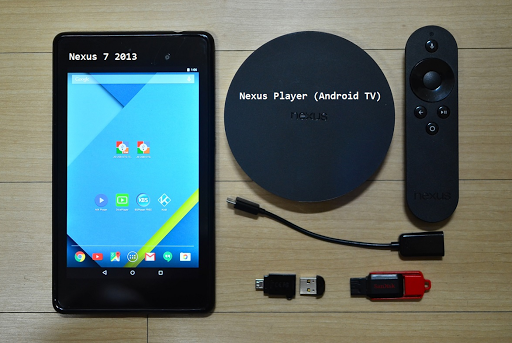

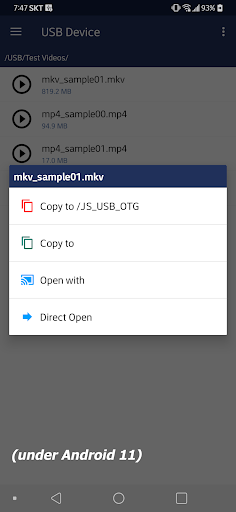


About JS USB OTG
● Does not need rooting.
● NTFS, ExFAT, FAT32 filesystem are supported. (Read-Only)
● USB drive, flash card should be formatted by NTFS or ExFAT or FAT32 filesystem. (Less than 2TB)
【 Video Streaming 】
ㆍ Without the need to save video files in the mobile device, you can directly watch a video by streaming. (http streaming)
ㆍ mp4, mkv, avi, mov, wmv, mpg, mpeg, flv, m4v, webm, 3gp, ts, mts, m2ts, iso streaming.
ㆍ Internal streaming. Does not need to turn on the Wifi or LTE / 5G network.
ㆍ By streaming, Play, Pause, Jump, Resume are possible for a video file which is over 4GB size.
ㆍ Recommend JS Player(from jsolwindlabs. mobile only), KODI(XBMC) as a video player that support http streaming.
ㆍ Click video file and select ‘Open With’.
【 Built-in Video Player 】
ㆍ In addition to the 3rd party video player mentioned above, you can also use the built-in video player.
ㆍ No need to save the video file to your mobile device.
ㆍ Based on Google ExoPlayer.
ㆍ Supported container extensions: mp4, mkv, mov, ts, mpg, mpeg, webm.
ㆍ Supports Fast Rewind and Fast Forward with left and right double tap (Left and Right buttons for Android TV).
ㆍ Supports selection of multi-audio and multi-subtitles embedded in video file.
ㆍ External subtitle file is automatically read when saved with the same file name in the ‘Download’ folder of the local storage. Subrip (srt) format encoded by UTF8.
ㆍ Android 11 or higher - After copying a srt subtitle from USB to Downloads collection, the actual local file path of srt is 'Movies' directory. Please refer to it when using a 3rd party video player.
ㆍ Click video file and select ‘Direct Open’.
【 Built-in Image Viewer 】
ㆍ No need to save the image file to your mobile device.
ㆍ Supported image formats : png, jpg/jpeg, bmp, gif
ㆍ Full screen slideshow through the swiping right/left (for image files in the same folder)
ㆍ Pinch to zoom in/out
ㆍ Fit an image to screen by double tap.
ㆍ Click image file and select ‘Direct Open’.
【 Built-in Music Player 】
ㆍ No need to save audio files in the mobile device.
ㆍ Supported audio formats : mp3, flac, ogg
ㆍ Audio files in the same folder.
ㆍ Play, Pause, Stop, Prev, Next, Shuffle, Repeat.
ㆍ Background play by Home Button.
ㆍ Click audio file and select ‘Direct Open’.
【 Android TV version 】
ㆍ Functions are same with mobile version. UI is different.
ㆍ Built-in music player : click left or right button on the list for moving focus to the control panel.
【 Changes on Android 11 or higher devices related to local storage 】
ㆍFrom Android 11 or higher devices, the local storage security has been strengthened, and the app function has been changed to show media files (Video, Audio, Image) in the local storage.
- When you copy a file from USB to your mobile device, video file is added to the video collection in local storage, audio file is added to the audio collection, and image file is added to the image collection (Shared concept)
- If you copy a file other than the media file type, it is added to
Frequently Asked Questions
Is JS USB OTG free?
No, JS USB OTG costs USD3.99.
What is the rating of JS USB OTG?
JS USB OTG has a 3.0 out of 5 star rating based on 303 reviews on the Google Play.
Who made JS USB OTG?
JS USB OTG was developed by jsolwindlabs. Visit their website at https://sites.google.com/site/jsolwindlabs/home.
Developer
Explore More
Related Video Players & Editors Apps






Share & Embed
Use these badges on your website or blog to link back to this app's data.
Rating Badge
<a href="https://apppricinglab.com/app/google_play/com.jsolwindlabs.usbotg"><img src="https://apppricinglab.com/api/badge/rating?store=google_play&app=com.jsolwindlabs.usbotg" alt="JS USB OTG rating on App Pricing Lab" /></a>Rank Badge
<a href="https://apppricinglab.com/app/google_play/com.jsolwindlabs.usbotg"><img src="https://apppricinglab.com/api/badge/rank?store=google_play&app=com.jsolwindlabs.usbotg" alt="JS USB OTG ranking on App Pricing Lab" /></a>