3.6★
8.3K reviews
1.0M
Installs
Aug 3, 202
Released
2025-12-22
Last Updated
Rankings
| Category | Collection | Rank | Date |
|---|---|---|---|
| ART_AND_DESIGN | topgrossing | #64 | 2026-03-10 |
| ART_AND_DESIGN | topselling_free | #80 | 2026-03-10 |
Screenshots
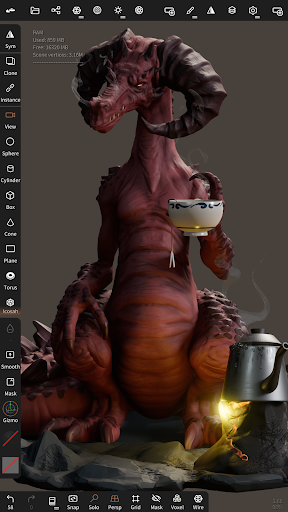


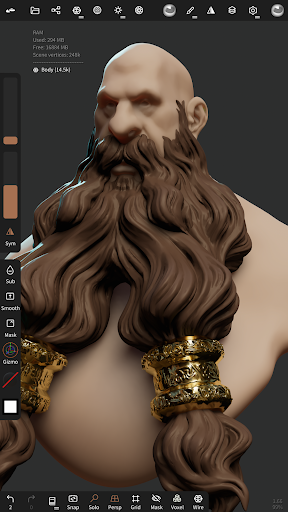
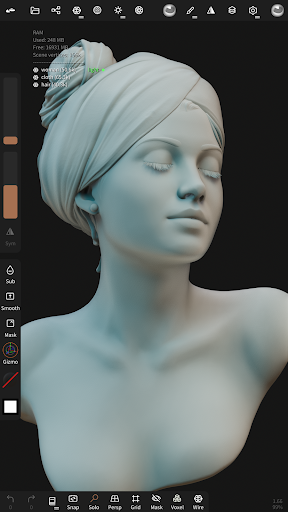

About Nomad Sculpt
• Sculpting tools
Clay, flatten, smooth, mask and many other brushes will let you shape your creation.
You can also use the trim boolean cutting tool with lasso, rectangle and other shapes, for hardsurface purposes.
• Stroke customization
Falloff, alphas, tilings, pencil pressure and other stroke parameters can be customized.
You can save and load your tools preset as well.
• Painting tools
Vertex painting with color, roughness and metalness.
You can easily manage all your material presets as well.
• Layers
Record your sculpting and painting operations in separate layers for easier iteration during the creation process.
Both the sculpting and painting changes are recorded.
• Multiresolution sculpting
Go back and forth between multiple resolution of your mesh for a flexible workflow.
• Voxel remeshing
Remesh quickly your mesh to get a uniform level of detail.
It can be used to quickly sketch a rough shape at the beginning of the creation process.
• Dynamic topology
Refine locally your mesh under your brush to get an automatic level of detail.
You can even keep your layers, as they will be automatically updated!
• Decimate
Reduce the number of polygons by keeping as many details as possible.
• Face Group
Segment your mesh into subgroups with the face group tool.
• Automatic UV unwrap
The automatic UV unwrapper can use face groups to control the unwrapping process.
• Baking
You can transfer vertex data such as color, roughness, metalness and small scaled detail in to textures.
You can also do the opposite, transfering textures data into vertex data or layers.
• Primitive shape
Cylinder, torus, tube, lathe and other primitives can be used to quickly start new shapes from scratch.
• PBR rendering
Beautiful PBR rendering by default, with lighting and shadows.
You can always switch to matcap for a more standard shading for sculpting purposes.
• Post processing
Screen Space Reflection, Depth of Field, Ambient Occlusion, Tone mapping, etc
• Export and Import
Supported formats include glTF, OBJ, STL or PLY files.
• Interface
Easy-to-use interface, designed for mobile experience.
Customization is possible as well!
Frequently Asked Questions
Is Nomad Sculpt free?
Yes, Nomad Sculpt is free to download. It offers in-app purchases.
What is the rating of Nomad Sculpt?
Nomad Sculpt has a 3.6 out of 5 star rating based on 8.3K reviews on the Google Play.
Who made Nomad Sculpt?
Nomad Sculpt was developed by Hexanomad. Visit their website at https://nomadsculpt.com/.
Developer
Explore More
Related Art & Design Apps







Share & Embed
Use these badges on your website or blog to link back to this app's data.
Rating Badge
<a href="https://apppricinglab.com/app/google_play/com.stephaneginier.nomad"><img src="https://apppricinglab.com/api/badge/rating?store=google_play&app=com.stephaneginier.nomad" alt="Nomad Sculpt rating on App Pricing Lab" /></a>IAP Badge
<a href="https://apppricinglab.com/iap/google_play/com.stephaneginier.nomad"><img src="https://apppricinglab.com/api/badge/iap?store=google_play&app=com.stephaneginier.nomad" alt="Nomad Sculpt IAP prices on App Pricing Lab" /></a>Rank Badge
<a href="https://apppricinglab.com/app/google_play/com.stephaneginier.nomad"><img src="https://apppricinglab.com/api/badge/rank?store=google_play&app=com.stephaneginier.nomad" alt="Nomad Sculpt ranking on App Pricing Lab" /></a>