Driver: Driving & Dash Cam App
▶️ Google PlayMaps & NavigationFreeIn-App PurchasesEveryone
4.1★
4.1K reviews
100.0K
Installs
Mar 29, 20
Released
2026-02-27
Last Updated
Rankings
| Category | Collection | Rank | Date |
|---|---|---|---|
| MAPS_AND_NAVIGATION | topgrossing | #117 | 2026-03-10 |
Screenshots


About Driver: Driving & Dash Cam App
Driver offers a fully connected driving experience through our Cloud + App platform, driver education, legal and vehicle support, partner deals, and more. The Driver App is available on both Android Automotive and mobile devices.
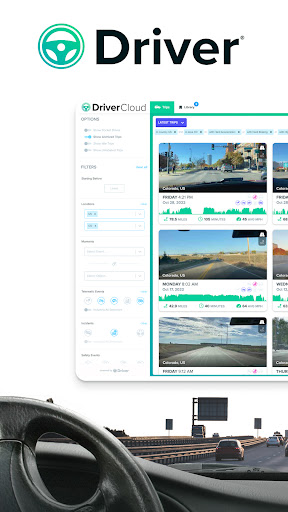
The Driver App has two primary modes for liability protection: 1) Telematics 2) Dash Cam. On Android Automotive, Driver automatically collects precise Telematics data directly from your vehicle, e.g. mileage, location, speed, G-force, etc. Pair your trip’s vehicle data with video recordings by using the Driver App on your mobile device, which turns your phone into a dash cam.
Both Telematics and Dash Cam are automatically uploaded to the Driver Cloud for easy viewing and management across any browser or mobile device. Sharing a trip with your insurance, boss, or family is as easy as sending a URL link to your trip on the Driver Cloud.
DRIVER AI:
Incident Detection and Coaching
Detect hard braking, hard accelerations, speeding, near accidents, unsafe following events, and more.
TELEMATICS MODE (AVAILABLE ON BOTH ANDROID AUTOMOTIVE & MOBILE):
Create a running diary of all your trips: all the data you need to share your story.
DASH CAM MODE (AVAILABLE ON MOBILE):
Store over 1000 hours of HD video on Driver Cloud
Backup full length videos of your trips to the Driver Cloud with a 90-day lookback.
Record your drives
Unlimited HD video recording. Simply open Driver and starting a recording.
Dual-Camera Mode
Record external & internal video simultaneously. Both video files are attached to each trip for easy and convenient viewing. The feature is available on certain Android devices.
App Switcher
Driver will continue to record in the background while you use other apps.
TIPS FOR MOBILE USAGE:
- Use Driver App alongside your preferred navigation and music apps by either connecting your phone to Android Auto or simply switching apps and utilizing Driver’s background recording capabilities.
- Use a dash mount that allows Dash Cam mode to record in landscape
- For longer trips, keep your phones plugged into your charger (USB cable)
- During hot summer days, avoid prolonged exposure to direct sunlight
ABOUT DRIVER:
At Driver, our mission is to make driving safer and smarter for everyone. The non-paid version of the App is ad-free and absolutely free. Please check out https://www.drivertechnologies.com to learn more about Driver’s product offerings.
We will charge your account when you purchase a Driver Premium subscription plan. Your account will automatically be charged for renewal within 24-hours before the end of the current subscription period unless you disable auto-renew. You can turn off auto-renewal at any time by going to your Account Settings on the Play Store after purchase.
Privacy Policy: https://www.drivertechnologies.com/how-we-protect-your-privacy
Terms and Conditions: https://www.drivertechnologies.com/terms-and-conditions
============
Note: GPS is required. Like other GPS-based apps, continue
Frequently Asked Questions
Is Driver: Driving & Dash Cam App free?
Yes, Driver: Driving & Dash Cam App is free to download. It offers in-app purchases.
What is the rating of Driver: Driving & Dash Cam App?
Driver: Driving & Dash Cam App has a 4.1 out of 5 star rating based on 4.1K reviews on the Google Play.
Who made Driver: Driving & Dash Cam App?
Driver: Driving & Dash Cam App was developed by www.TryDriver.com. Visit their website at https://www.trydriver.com.
Developer
Explore More
Related Maps & Navigation Apps







Share & Embed
Use these badges on your website or blog to link back to this app's data.
Rating Badge
<a href="https://apppricinglab.com/app/google_play/com.trydriver.driver"><img src="https://apppricinglab.com/api/badge/rating?store=google_play&app=com.trydriver.driver" alt="Driver: Driving & Dash Cam App rating on App Pricing Lab" /></a>IAP Badge
<a href="https://apppricinglab.com/iap/google_play/com.trydriver.driver"><img src="https://apppricinglab.com/api/badge/iap?store=google_play&app=com.trydriver.driver" alt="Driver: Driving & Dash Cam App IAP prices on App Pricing Lab" /></a>Rank Badge
<a href="https://apppricinglab.com/app/google_play/com.trydriver.driver"><img src="https://apppricinglab.com/api/badge/rank?store=google_play&app=com.trydriver.driver" alt="Driver: Driving & Dash Cam App ranking on App Pricing Lab" /></a>