
Grid # - Add grid on image Price Snapshot
Grid # - Add grid on image by 金鹏 王 is free to download on the Apple App Store, and offers 1 in-app purchases from $3.99–$3.99 (avg $3.99). It holds a 4.6★ rating from 9.6K reviews.
Latest IAP data: 2026-05-31. Listing last updated: 2024-04-09. Source: public Apple App Store data, compiled via the App Pricing Lab methodology.
4.6★
9.6K reviews
2015-09-11
Released
2024-04-09
Last Updated
Rankings
| Category | Collection | Rank | Date |
|---|---|---|---|
| PHOTO_AND_VIDEO | top-free-ipad | #106 | 2026-03-12 |
In-App Purchase Overview
1
IAP Items
$3.99
Cheapest
$3.99
Most Expensive
$3.99
Average Price
In-App Purchases (1 items)
[More features & Remove Ads]
$3.99
Screenshots
About Grid # - Add grid on image
I believe there are always some people in this world who want to add grids to images, just like me. That's why I developed Grid#. Hope it helps.
Features:
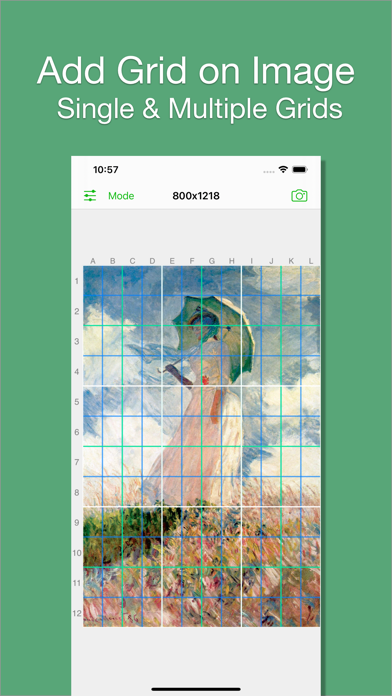
1. Add grid on image.
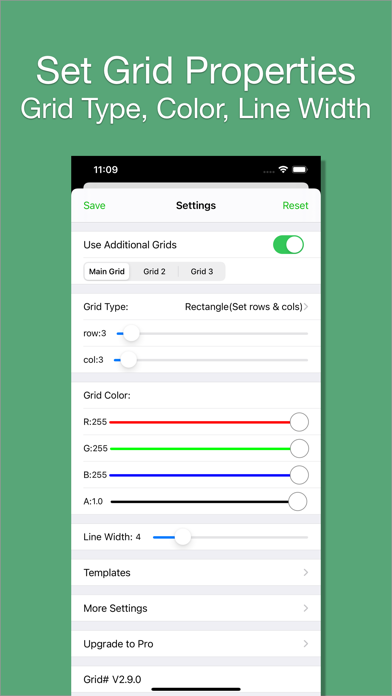
2. There are 5 types of grids you can choose:
- a. Rectangle(Set rows & cols)
- b. Square(Set rows only)
- c. Square(Set cols only)
- d. Rectangle(Set row height & col width)
- e. Square(Set row height only)[pro feature]
3. The lines can be colourful. Use whatever RGB color you like. You can change lines' transparency.
4. You can change line width (from 1 to 20).
5. You can add multiple grids(at most 3) on the image.
[grid 3 is pro feature]
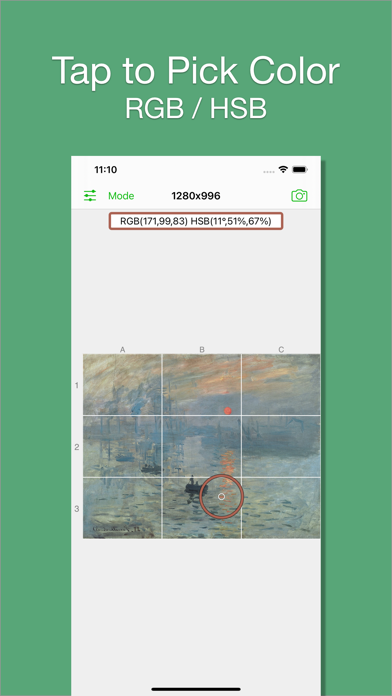
6. You can pick colors from image.
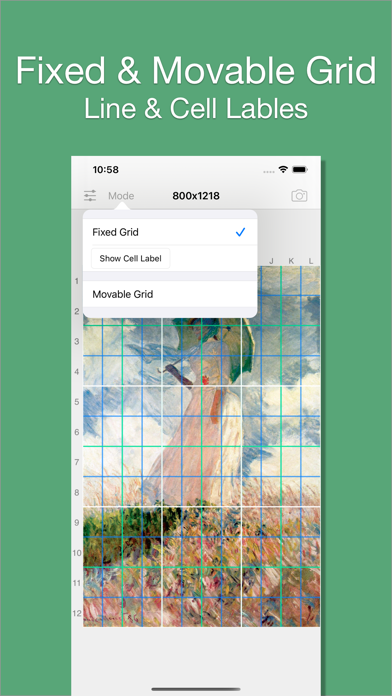
7. There are 2 modes:
- a. Fixed Grid: Grid cannot be moved nor be rotated.
- b. Movable Grid[pro feature]: Grid can be move, or be rotated (Move two fingers around each other to rotate the grid)
Frequently Asked Questions
Is Grid # - Add grid on image free?
Yes, Grid # - Add grid on image is free to download. It offers 1 in-app purchases.
What is the rating of Grid # - Add grid on image?
Grid # - Add grid on image has a 4.6 out of 5 star rating based on 9.6K reviews on the Apple App Store.
What are the in-app purchase prices for Grid # - Add grid on image?
Grid # - Add grid on image offers 1 in-app purchases. View full price history.
Who made Grid # - Add grid on image?
Grid # - Add grid on image was developed by 金鹏 王.
Developer
Explore More
Related Photo & Video Apps


Share & Embed
Use these badges on your website or blog to link back to this app's data.
Rating Badge
<a href="https://apppricinglab.com/app/apple/1033011034"><img src="https://apppricinglab.com/api/badge/rating?store=apple&app=1033011034" alt="Grid # - Add grid on image rating on App Pricing Lab" /></a>IAP Badge
<a href="https://apppricinglab.com/iap/apple/1033011034"><img src="https://apppricinglab.com/api/badge/iap?store=apple&app=1033011034" alt="Grid # - Add grid on image IAP prices on App Pricing Lab" /></a>Rank Badge
<a href="https://apppricinglab.com/app/apple/1033011034"><img src="https://apppricinglab.com/api/badge/rank?store=apple&app=1033011034" alt="Grid # - Add grid on image ranking on App Pricing Lab" /></a>