
My Scanner: Scan to PDF & Edit Price Snapshot
My Scanner: Scan to PDF & Edit by Dream App Studio UAB is free to download on the Apple App Store, with no in-app purchases. It holds a 4.9★ rating from 16 reviews.
Listing last updated: 2026-02-10. Source: public Apple App Store data, compiled via the App Pricing Lab methodology.
4.9★
16 reviews
2020-05-20
Released
2026-02-10
Last Updated
Rankings
| Category | Collection | Rank | Date |
|---|---|---|---|
| BUSINESS | top-grossing | #37 | 2026-03-12 |
| BUSINESS | top-grossing-ipad | #58 | 2026-03-12 |
Screenshots
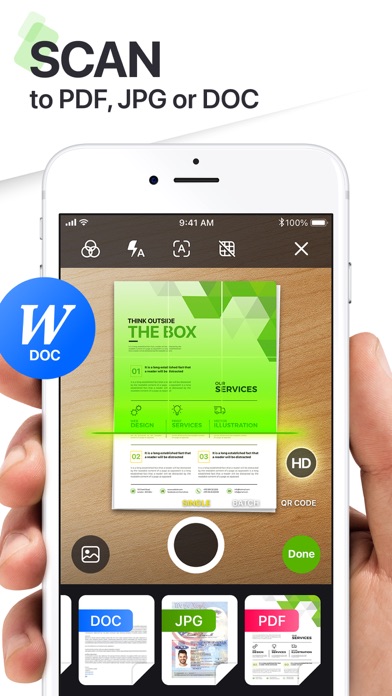


About My Scanner: Scan to PDF & Edit
Meet My Scanner – your intelligent all-in-one document and productivity companion. Whether you're scanning receipts, editing PDFs, or creating content with AI, My Scanner transforms your device into a powerhouse for getting things done—faster, smarter, and paper-free.
SCAN. EDIT. WRITE. SOLVE. ALL IN ONE PLACE.
Designed for professionals, students, and everyday users alike, My Scanner delivers the tools you need to take control of your documents and solve your office and educational tasks - all from your iPhone or iPad.
ULTRA-FAST PDF SCANNER
• Scan documents, books, notes, or whiteboards in seconds
• Smart edge detection & auto-enhancement for crystal-clear quality
• Export as high-resolution PDFs or JPGs
ADVANCED PDF EDITOR
• Add text, highlight, underline, or draw directly on your PDFs
• Fill out forms, add e-signatures, or annotate effortlessly
• Rearrange, merge, split, and organize pages with drag-and-drop simplicity
BUILT-IN AI WRITING ASSISTANT
• Write smarter with your personal AI writing companion
• Draft emails, create essays, brainstorm ideas, summarize text & more
• Rewrite, correct grammar, and even generate content tailored to your style
• Available 24/7—no typing limits, no creative blocks
SECURE & PRIVATE
• Keep your documents safe with Face ID, Touch ID, or passcode protection
• Offline scanning and editing to protect your privacy
MORE SMART TOOLS & UTILITIES
- AR Ruler: Instantly measure objects or distances using augmented reality
- Object Counter: Use your camera to count multiple items in real time
- ID Photo Maker: Create compliant ID photos in seconds—passport, visa & more
- Math & Science Solver: Scan handwritten or printed equations and get instant solutions
- Invoice Creator: Generate professional invoices on the go
- Tax Form Filler: Easily complete and export tax documents
- Text Extractor (OCR): Pull editable text from any image or scanned page
- E-Sign Documents: Sign contracts and official documents digitally and securely
- PDF Converter: Quickly convert PDFs to and from various formats including Word, Excel, PowerPoint, images, and more — all without leaving the app
WHY USERS LOVE MY SCANNER
• Combines powerful scanning with intelligent AI writing
• Replaces multiple apps with one seamless productivity tool
• Works offline for scanning & editing, with full privacy control
• Sleek, intuitive interface that gets out of your way
Whether you're in the office, classroom, or on the go, My Scanner is your trusted partner for document management and writing assistance.
Download now and experience the freedom of smart productivity.
Your documents, your words—enhanced by AI.
Created with passion by Dream App Studio team.
The app contains the following subscription options:
Weekly subscription
Monthly subscription
Quarterly subscription
Annual subscription
Subscription automatically renews unless auto-renew is turned off at least 24-hours prior to the end of the current period. The cost of renewal is equal to th
Frequently Asked Questions
Is My Scanner: Scan to PDF & Edit free?
Yes, My Scanner: Scan to PDF & Edit is free to download.
What is the rating of My Scanner: Scan to PDF & Edit?
My Scanner: Scan to PDF & Edit has a 4.9 out of 5 star rating based on 16 reviews on the Apple App Store.
Who made My Scanner: Scan to PDF & Edit?
My Scanner: Scan to PDF & Edit was developed by Dream App Studio UAB. Visit their website at https://apps.apple.com/us/developer/dream-app-studio-uab/id1367138525?uo=2.
Developer
Explore More
Related Business Apps





Share & Embed
Use these badges on your website or blog to link back to this app's data.
Rating Badge
<a href="https://apppricinglab.com/app/apple/1384875146"><img src="https://apppricinglab.com/api/badge/rating?store=apple&app=1384875146" alt="My Scanner: Scan to PDF & Edit rating on App Pricing Lab" /></a>Rank Badge
<a href="https://apppricinglab.com/app/apple/1384875146"><img src="https://apppricinglab.com/api/badge/rank?store=apple&app=1384875146" alt="My Scanner: Scan to PDF & Edit ranking on App Pricing Lab" /></a>