
MinuteTaker - Meeting Notes Price Snapshot
MinuteTaker - Meeting Notes by Florian Mielke is free to download on the Apple App Store, with no in-app purchases. It holds a 4.4★ rating from 80 reviews.
Listing last updated: 2026-02-16. Source: public Apple App Store data, compiled via the App Pricing Lab methodology.
4.4★
80 reviews
2012-04-21
Released
2026-02-16
Last Updated
Rankings
| Category | Collection | Rank | Date |
|---|---|---|---|
| PRODUCTIVITY | keyword:productivity apps | #54 | 2026-03-12 |
| BUSINESS | keyword:business apps | #185 | 2026-03-12 |
Screenshots


About MinuteTaker - Meeting Notes
Create structured meeting minutes, summaries, and notes. Share them as clean and professional looking PDF-file with all attendees.
MinuteTaker is aimed at all professionals who need to capture and manage notes, minutes, reports, and transcripts in a structured way.
Available since 2012 and in use by users and companies worldwide.
ESSENTIALS
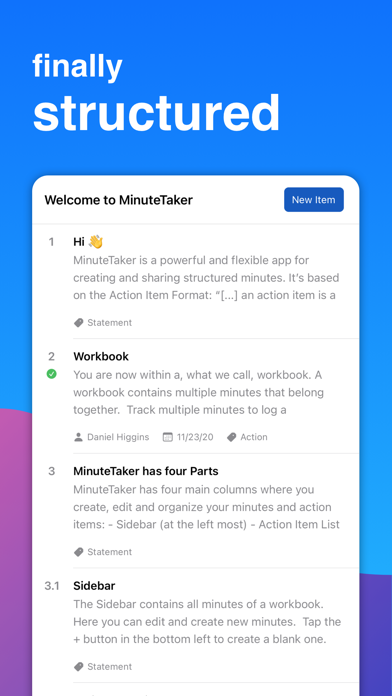
MinuteTaker is based on the Action Item Format. Every decision, statement, or recommendation is described as a short and concise point that keeps your protocols short
and precise.
PROFESSIONALS
• Architect
• Site Manager, Construction Manager
• Therapist (Physiotherapist, Psychotherapist, ...)
• Lawyer
• Project Manager
• Team Manager
• Student
• Assistant
KEEP TRACK
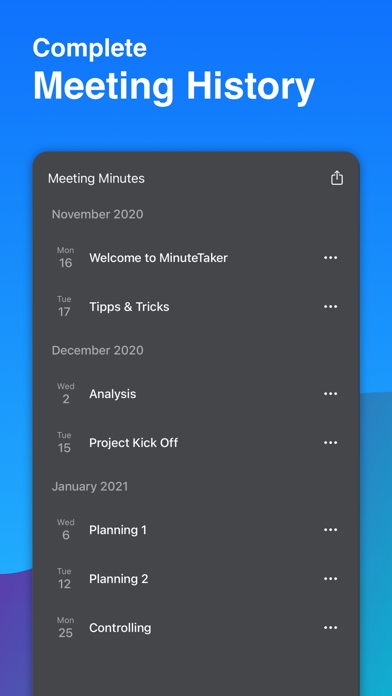
MinuteTaker groups related minutes within the workbook, e.g., to track a project, recurring team meeting, or appointments for a specific customer. With that, you always get the big picture of what’s happening.
In addition, MinuteTaker offers various search and filter capabilities:
• Full-text search
• Filter by state (open, done, or overdue)
• Filter by a responsible person
• Filter by tags
ACTION ITEMS
In addition to the text of the item, you can add additional information:
• Responsible person
• Due date (day or week)
• Custom tags, e.g., action, statement, recommendation, ...
• State: open, done, overdue (overdue is set automatically)
• Structure your action items using subitems, e.g., 1.1, 1.2, 1.3, ...
ATTACHMENTS
Related attachments can supplement every action item:
• Documents (Word, Excel, Pages, ...)
• Images from your library
• Pictures taken from a flip chart or whiteboard with the device’s camera
• Add scribbles and notes to images
SHARING
• Share your minutes as professional looking PDF-files (incl. all attachments) via email to all attendees and recipients.
• Share action items with assigned people
• Create your calendar events based on an action item
• Create a todo in your app, e.g., Reminder of Things
SYNCHRONISATION AND COLLABORATION
• Sync your minutes via iCloud on all your devices
• Collaborate with others via “Share in iCloud”
SUBSCRIPTION
To get full access to all MinuteTaker features, you have to subscribe. We offer a monthly or annual subscription that unlocks all features on all your devices. Try out all features with a 14-day trial.
QUESTIONS?
If you have questions or suggestions, contact us at feedback@minutetaker.app or via Twitter (@MinuteTakerApp).
Terms: https://minutetaker.app/terms
Privacy: https://minutetaker.app/privacy
Frequently Asked Questions
Is MinuteTaker - Meeting Notes free?
Yes, MinuteTaker - Meeting Notes is free to download.
What is the rating of MinuteTaker - Meeting Notes?
MinuteTaker - Meeting Notes has a 4.4 out of 5 star rating based on 80 reviews on the Apple App Store.
Who made MinuteTaker - Meeting Notes?
MinuteTaker - Meeting Notes was developed by Florian Mielke. Visit their website at https://minutetaker.app.
Developer
Explore More
Related Business Apps





Share & Embed
Use these badges on your website or blog to link back to this app's data.
Rating Badge
<a href="https://apppricinglab.com/app/apple/519543986"><img src="https://apppricinglab.com/api/badge/rating?store=apple&app=519543986" alt="MinuteTaker - Meeting Notes rating on App Pricing Lab" /></a>Rank Badge
<a href="https://apppricinglab.com/app/apple/519543986"><img src="https://apppricinglab.com/api/badge/rank?store=apple&app=519543986" alt="MinuteTaker - Meeting Notes ranking on App Pricing Lab" /></a>