
Kino - Pro Video Camera Price Snapshot
Kino - Pro Video Camera by Lux Optics Incorporated is priced at $9.99 on the Apple App Store, with no in-app purchases. It holds a 4.8★ rating from 107 reviews.
Listing last updated: 2026-03-08. Source: public Apple App Store data, compiled via the App Pricing Lab methodology.
4.8★
107 reviews
2024-05-29
Released
2026-03-08
Last Updated
Rankings
| Category | Collection | Rank | Date |
|---|---|---|---|
| BOOKS | top-paid | #93 | 2026-08-07 |
| BUSINESS | top-paid | #93 | 2026-08-07 |
| DEVELOPER_TOOLS | top-paid | #93 | 2026-08-07 |
| EDUCATION | top-paid | #93 | 2026-08-07 |
| ENTERTAINMENT | top-paid | #93 | 2026-08-07 |
| FINANCE | top-paid | #93 | 2026-08-07 |
| FOOD_AND_DRINK | top-paid | #93 | 2026-08-07 |
| GAMES | top-paid | #93 | 2026-08-07 |
| GRAPHICS_AND_DESIGN | top-paid | #93 | 2026-08-07 |
| HEALTH_AND_FITNESS | top-paid | #93 | 2026-08-07 |
| LIFESTYLE | top-paid | #93 | 2026-08-07 |
| MEDICAL | top-paid | #93 | 2026-08-07 |
| MUSIC | top-paid | #93 | 2026-08-07 |
| NAVIGATION | top-paid | #93 | 2026-08-07 |
| NEWS | top-paid | #93 | 2026-08-07 |
| PHOTO_AND_VIDEO | top-paid | #93 | 2026-08-07 |
| PRODUCTIVITY | top-paid | #93 | 2026-08-07 |
| REFERENCE | top-paid | #93 | 2026-08-07 |
| SHOPPING | top-paid | #93 | 2026-08-07 |
| SOCIAL_NETWORKING | top-paid | #93 | 2026-08-07 |
| SPORTS | top-paid | #93 | 2026-08-07 |
| TRAVEL | top-paid | #93 | 2026-08-07 |
| UTILITIES | top-paid | #93 | 2026-08-07 |
| WEATHER | top-paid | #93 | 2026-08-07 |
| BOOKS | top-paid | #87 | 2026-08-02 |
| BUSINESS | top-paid | #87 | 2026-08-02 |
| DEVELOPER_TOOLS | top-paid | #87 | 2026-08-02 |
| EDUCATION | top-paid | #87 | 2026-08-02 |
| ENTERTAINMENT | top-paid | #87 | 2026-08-02 |
| FINANCE | top-paid | #87 | 2026-08-02 |
| FOOD_AND_DRINK | top-paid | #87 | 2026-08-02 |
| GAMES | top-paid | #87 | 2026-08-02 |
| GRAPHICS_AND_DESIGN | top-paid | #87 | 2026-08-02 |
| HEALTH_AND_FITNESS | top-paid | #87 | 2026-08-02 |
| LIFESTYLE | top-paid | #87 | 2026-08-02 |
| MEDICAL | top-paid | #87 | 2026-08-02 |
| MUSIC | top-paid | #87 | 2026-08-02 |
| NAVIGATION | top-paid | #87 | 2026-08-02 |
| NEWS | top-paid | #87 | 2026-08-02 |
| PHOTO_AND_VIDEO | top-paid | #87 | 2026-08-02 |
| PRODUCTIVITY | top-paid | #87 | 2026-08-02 |
| REFERENCE | top-paid | #87 | 2026-08-02 |
| SHOPPING | top-paid | #87 | 2026-08-02 |
| SOCIAL_NETWORKING | top-paid | #87 | 2026-08-02 |
| SPORTS | top-paid | #87 | 2026-08-02 |
| TRAVEL | top-paid | #87 | 2026-08-02 |
| UTILITIES | top-paid | #87 | 2026-08-02 |
| WEATHER | top-paid | #87 | 2026-08-02 |
| BOOKS | top-paid | #100 | 2026-08-01 |
| BUSINESS | top-paid | #100 | 2026-08-01 |
Ranking History — Top Paid
Best: #20 · Worst: #91 · 5 days tracked
Screenshots



About Kino - Pro Video Camera
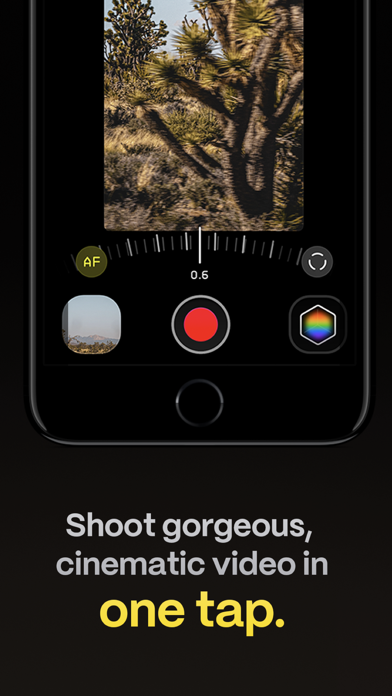
Make great video easy! Kino lets you just press record and create cinematic video with color presets created by expert filmmakers—no edit required. Plus, with “AutoMotion,” the app automatically creates that smooth "film look" you see at the movies. Shoot great video with no film school required.
Are you an experienced filmmaker? Kino includes all the features you need to shoot like a Pro, such as a full manual mode, focus peaking, color waveform, audio meters, and more. If you’re experienced in color, you can import LUTs quickly and use the same powerful Instant Grade feature to output video with baked in LUTs.
Regardless of your skill level, Kino adapts to your needs. Pick your experience level when setting up the app to dial things in your way or go with recommended, simple settings. The beautiful, simple interface shows only essential things, while keeping powerful features under thumb’s reach.
INSTANT GRADE
Kino comes packed with pro color presets by experts like Stu Maschwitz, Sandwich Video, Evan Schneider, Tyler Stalman and Kevin Ong. With one tap, you can shoot video with cinematic, film-like color by selecting a Grade preset. With Instant Grade, you don’t have to apply it later or do any editing steps: Kino just saves the processed video for you, ready to share.
LEARN ALONG
Getting started with video? The Kino team has a free series of lessons prepared you can dive into right away to learn filmmaking with the app. Start out with our simple recommended settings and enroll in a lesson plan to get lessons emailed to you that are easy to follow and let you unlock every feature of the app to use for making better videos.
PRO TOOLS
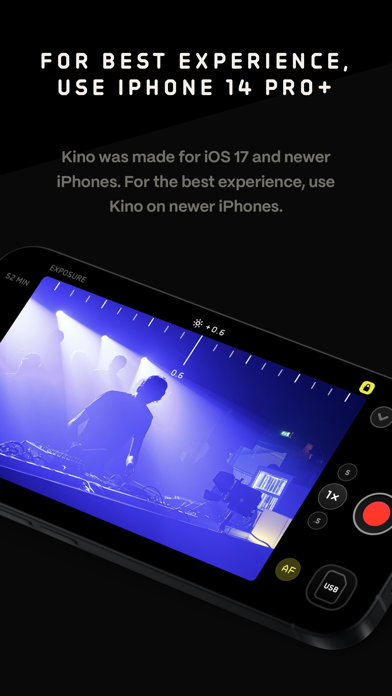
Kino’s simple interface does not mean it lacks in powerful pro tools. Start out with automatic exposure with EV adjustment and AE and WB lock, or drop into full manual mode with shutter speed, angle and ISO adjustment. Compose a shot with the grid with built in level, check exposure with the RGB waveform, and pull focus with focus peaking. Kino can store your recordings in Files instead of Photos for better and easy shot management, and even features a screen lock to prevent inadvertent taps messing up your shot. Set custom recording settings (like 4K 60FPS Apple Log ProRes422HQ on iPhone 15 Pro) or get started with presets for flexibiltiy.
BEAUTIFUL INTERFACE
Thoughtful touches are abound in Kino: from a screen-wide telltale ring to show you are recording, to beautiful custom typography throughout with our own bespoke fonts, Kino balances beauty and simplicity with flexibility and control for users of any skill level.
AUTOMOTION
Get cinematic motion like in feature films. Introducing: AutoMotion. Kino biases exposure towards a 180° shutter speed by default. If you land in this sweet spot, and available light supports it, the ‘Auto’ label turns green — showing you are in the sweet spot for great cinematic motion. Bright day out? Pop an ND filter on your iPhone and don’t worry about adjusting manual
Frequently Asked Questions
Is Kino - Pro Video Camera free?
No, Kino - Pro Video Camera costs $9.99.
What is the rating of Kino - Pro Video Camera?
Kino - Pro Video Camera has a 4.8 out of 5 star rating based on 107 reviews on the Apple App Store.
Who made Kino - Pro Video Camera?
Kino - Pro Video Camera was developed by Lux Optics Incorporated. Visit their website at https://apps.apple.com/us/developer/lux-optics-incorporated/id885697371?uo=2.
Developer
Explore More
Compare Kino - Pro Video Camera with...
 Kino - Pro Video Camera vs Love Island USA
 Kino - Pro Video Camera vs Peacock TV: Stream TV & Movies
 Kino - Pro Video Camera vs Kalshi: Trade Football & more
 Kino - Pro Video Camera vs MapQuest GPS Navigation & Maps
 Kino - Pro Video Camera vs Capital One Mobile
 Kino - Pro Video Camera vs NCAA March Madness Live
Related PHOTO_AND_VIDEO Apps





Share & Embed
Use these badges on your website or blog to link back to this app's data.
Rating Badge
<a href="https://apppricinglab.com/app/apple/6472380172"><img src="https://apppricinglab.com/api/badge/rating?store=apple&app=6472380172" alt="Kino - Pro Video Camera rating on App Pricing Lab" /></a>Rank Badge
<a href="https://apppricinglab.com/app/apple/6472380172"><img src="https://apppricinglab.com/api/badge/rank?store=apple&app=6472380172" alt="Kino - Pro Video Camera ranking on App Pricing Lab" /></a>