
iAutocue Price Snapshot
iAutocue by Sunshine Valley Systems is priced at $12.99 on the Apple App Store, with no in-app purchases. It holds a 3.0★ rating from 2 reviews.
Listing last updated: 2024-05-18. Source: public Apple App Store data, compiled via the App Pricing Lab methodology.
3.0★
2 reviews
2013-09-08
Released
2024-05-18
Last Updated
Rankings
| Category | Collection | Rank | Date |
|---|---|---|---|
| PHOTO_AND_VIDEO | top-paid-ipad | #59 | 2026-03-12 |
Screenshots

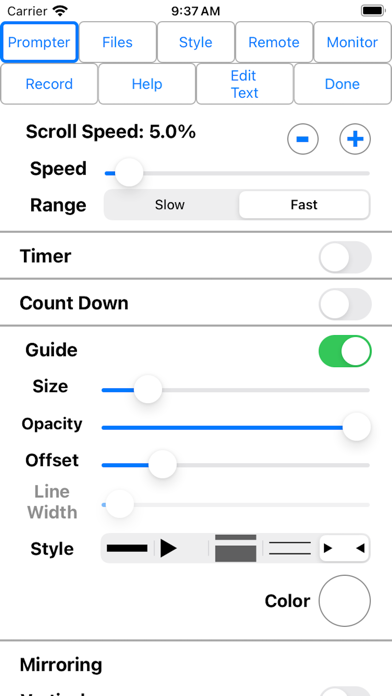


About iAutocue
iAutocue is a feature rich teleprompter for iPad designed to be powerful and yet intuitive. Includes a multitude of file sharing methods and remote controls. Display the content on an external monitor and even record video of yourself giving your speech.
Check out iAutoscroll, the free remote for iAutocue.
Easily configure the appearance of the text content to suit your presentation requirements including...
• Font
• Font Size
• Text Color
• Background Color
• Head and Tail Indent
• Line Spacing
• Text Style
Prompter features include:
• Import File Types: iAutocue (.iAutocue), Text (.txt), Rich Text (.rtf), Word (.docx) and HTML
• Export File Types: iAutocue (.iAutocue), Text (.txt), Rich Text (.rtf) and HTML
• Five Marker Styles: Bar, Marker, Two Line, Inverted, Two Markers
• Scroll Speed: Variable with two speed ranges.
• Display mirroring for using a reflective teleprompter
• Countdown: Two styles
• Bidirectional Timer
• External Monitor Support
• Built-in user manual
• Customizable title bar to give access to the features that are important to your workflow.
• More...
• File Sharing
iAutocue offers a variety of file sharing methods to assist in moving files between devices as well as a computer.
- iTunes File Sharing: Copy files to and from iAutocue using iTunes.
- Email Files: Email files from iAutocue and open files from other apps such as Mail.
- iOS File Sharing: Send files directly from one iAutocue to another.
- Web Server: Host a web page that can be used from any computer to upload and download files.
- Web Server Browser: Use built-in browser to load web page from another web server to download files or the entire database from another iAutocue.
- AirDrop: Use Apple's AirDrop to send files.
- iCloud: Upload and download files from iCloud Drive.
- Dropbox: Upload and download files from your Dropbox account.
- Google Drive: Upload and download files from your Google Drive account.
- iOS Remote Sharing: Send files and databases between host and peers.
• Remote Control
iAutocue has a variety different remote options.
- iOS Remote: Use another iOS device running iAutocue or iAutoscroll to control iAutocue. Synchronize multiple devices.
- Blue Tooth Keyboard: Assign keys of a blue tooth keyboard to control prompter features.
- Touch Tone Remote: Use touch tone signals playing into the microphone line-in to control prompter features.
- Audio Remote: Use the headphone in-line remote or other audio remote to control prompter features.
- AirTurn Remote: Use wireless remotes from www.airturn.com to control prompter features.
- Web Server Remote: Use a web page hosted on the network to control the prompter features.
- Apple Watch: Use the Apple Watch to remotely control prompter functions.
- Bluetooth MIDI: Use IK Multimedia's iRig Blueboard to control prompter functions.
- Game Controller: Use MFi game controllers to control prompter functions.
- Touch Recording: Record and playback your interactions with the prompter.
- Speech
Frequently Asked Questions
Is iAutocue free?
No, iAutocue costs $12.99.
What is the rating of iAutocue?
iAutocue has a 3.0 out of 5 star rating based on 2 reviews on the Apple App Store.
Who made iAutocue?
iAutocue was developed by Sunshine Valley Systems. Visit their website at http://www.sunshinevalleysystems.com/iAutocue/index.html.
Developer
Explore More
Related Photo & Video Apps


Share & Embed
Use these badges on your website or blog to link back to this app's data.
Rating Badge
<a href="https://apppricinglab.com/app/apple/694697820"><img src="https://apppricinglab.com/api/badge/rating?store=apple&app=694697820" alt="iAutocue rating on App Pricing Lab" /></a>Rank Badge
<a href="https://apppricinglab.com/app/apple/694697820"><img src="https://apppricinglab.com/api/badge/rank?store=apple&app=694697820" alt="iAutocue ranking on App Pricing Lab" /></a>