
StandBy Mode: Clock & Widgets
▶️ Google PlayPersonalizationFreeIn-App PurchasesContains AdsEveryone
StandBy Mode: Clock & Widgets Price Snapshot
StandBy Mode: Clock & Widgets by Zetabit Tecnologia is free to download on the Google Play, and offers in-app purchases. It holds a 4.6★ rating from 28.3K reviews.
Listing last updated: 2026-02-27. Source: public Google Play data, compiled via the App Pricing Lab methodology.
4.6★
28.3K reviews
1.0M
Installs
Jun 6, 202
Released
2026-02-27
Last Updated
Rankings
| Category | Collection | Rank | Date |
|---|---|---|---|
| PERSONALIZATION | topgrossing | #35 | 2026-03-10 |
Screenshots




About StandBy Mode: Clock & Widgets
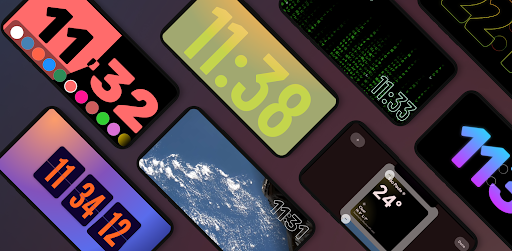
Transform your phone into a smart display while it charges. View key information from a distance, stay focused, and keep your aesthetic on point.
The app is organized into intuitive categories: Duo, Photos, Tools, Player, Weather, and Relax. You can navigate sideways to select from dozens of different widgets. Customize them to your liking, and the app will open automatically when you charge your phone.
Built natively with Material 3 for smooth performance, StandBy Mode Pro is frequently updated based on user feedback. We take your privacy seriously—everything runs locally on your device.
https://zetabitapps.com/privacy-policy
Have feedback or a feature request? Reach out to us: support@zetabitapps.com
✨ KEY FEATURES:
🕰️ Beautiful & Customizable Clocks
Choose from a wide range of fullscreen digital and analog clocks:
• Flip Clock (Retro style)
• Neon, Solar & Matrix Watch
• Big Crop Clock (Pixel-style)
• Radial Inverter (Burn-in safe)
• Day Clock (Big Text/Senior Friendly), Segmented Clock, Analog + Digital combo
Detailed customization gives you hundreds of unique layout possibilities.
📅 Duo Mode & Widgets
Productivity at a glance. Add two widgets side by side: clocks, calendars, music players, or any third-party widget. Resize, rearrange, and personalize.
📷 Photo Slide & Frame Mode
Turn your device into a digital photo frame. The AI auto-detects faces to ensure your memories are perfectly cropped and centered.
🛠️ Tools That Matter
• Fullscreen Timer & Stopwatch
• Schedule with Calendar integration
• Notification display (Experimental)
🌤️ Smart Weather Clocks
Real-time weather integrated into elegant clock displays. Supports fullscreen, edge-to-edge, or minimalist bottom layouts.
🛏️ Night Mode (AOD Style)
Sleep soundly. The app automatically dims screen brightness and tints widgets red to minimize eye strain in low light.
🔋 Quick Launch & Charging Logic
Set the app to auto-launch when you plug in your charger—or restrict it to landscape mode only.
🕹️ Vibes Radio
Built-in Lo-fi, ambient, and study-friendly radios with aesthetic visuals. Premium users can link any YouTube video to create their own background vibe.
🎵 Universal Player Control
Control playback from Spotify, YouTube Music, Apple Music, and more, directly from the StandBy screen.
🧩 Aesthetic Widgets
Create a fully personalized setup using modern Material Design styles.
🧲 Screen Saver Mode (Beta)
A new aesthetic upgrade that activates while your device is idle—perfect for long-use desk setups.
🔥 Burn-in Protection
Advanced chessboard pixel shifting keeps your OLED display safe during long sessions.
Unlock your Android's full potential.
Whether at your desk, on your nightstand, or docked at work, StandBy Mode Pro makes your screen useful and beautiful.
Frequently Asked Questions
Is StandBy Mode: Clock & Widgets free?
Yes, StandBy Mode: Clock & Widgets is free to download. It offers in-app purchases.
What is the rating of StandBy Mode: Clock & Widgets?
StandBy Mode: Clock & Widgets has a 4.6 out of 5 star rating based on 28.3K reviews on the Google Play.
Who made StandBy Mode: Clock & Widgets?
StandBy Mode: Clock & Widgets was developed by Zetabit Tecnologia. Visit their website at http://zetabitapps.com.
Developer
Explore More
Related Personalization Apps







Share & Embed
Use these badges on your website or blog to link back to this app's data.
Rating Badge
<a href="https://apppricinglab.com/app/google_play/br.com.zetabit.ios_standby"><img src="https://apppricinglab.com/api/badge/rating?store=google_play&app=br.com.zetabit.ios_standby" alt="StandBy Mode: Clock & Widgets rating on App Pricing Lab" /></a>IAP Badge
<a href="https://apppricinglab.com/iap/google_play/br.com.zetabit.ios_standby"><img src="https://apppricinglab.com/api/badge/iap?store=google_play&app=br.com.zetabit.ios_standby" alt="StandBy Mode: Clock & Widgets IAP prices on App Pricing Lab" /></a>Rank Badge
<a href="https://apppricinglab.com/app/google_play/br.com.zetabit.ios_standby"><img src="https://apppricinglab.com/api/badge/rank?store=google_play&app=br.com.zetabit.ios_standby" alt="StandBy Mode: Clock & Widgets ranking on App Pricing Lab" /></a>