
Photo Cleaner: Swipewipe
MWM - AI Music and Creative Apps
▶️ Google PlayToolsFreeIn-App PurchasesContains AdsEveryone
Photo Cleaner: Swipewipe Price Snapshot
Photo Cleaner: Swipewipe by MWM - AI Music and Creative Apps is free to download on the Google Play, and offers in-app purchases. It holds a 4.6★ rating from 4.9K reviews.
Listing last updated: 2026-01-30. Source: public Google Play data, compiled via the App Pricing Lab methodology.
4.6★
4.9K reviews
500.0K
Installs
Sep 19, 20
Released
2026-01-30
Last Updated
Rankings
| Category | Collection | Rank | Date |
|---|---|---|---|
| TOOLS | topgrossing | #164 | 2026-03-10 |
Screenshots



About Photo Cleaner: Swipewipe
Swipewipe is the app that will (finally) help you clean up your camera roll. And you’ll enjoy reminiscing while you do it.
We'll save you the time: Yes, there are other apps that can help you quickly delete photos on your phone. But none of them worked for us!
We wanted a simple, fun, elegant solution that let us go month-by-month, work our way through all our photos, videos, screenshots, and everything else in our camera roll, and decide - one by one - what to keep and what to get rid of. That’s Swipewipe.
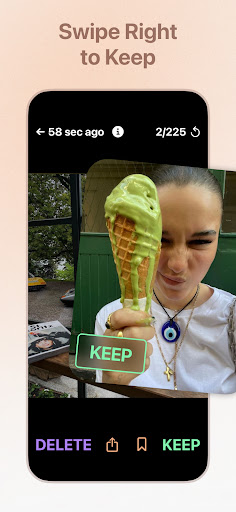
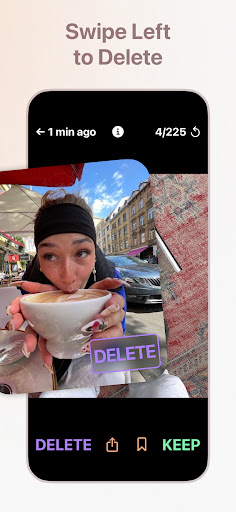
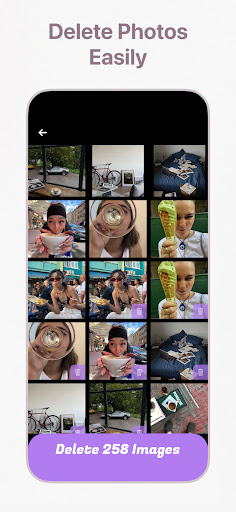
Here’s how it works: swipe right to keep a photo, and left to delete it. If you make a mistake or change your mind, just tap the current photo to go back. Hold down on a picture to see its metadata. After you’re done reviewing that month’s photos, take one last look at the photos you chose to keep and the ones you chose to delete, make any tweaks you need to, and then…you’re done!
Each time you finish a month, it'll be crossed out. (You can always revisit that month, though.) If you get part way through a month and want to take a break, you can quit the app - a progress wheel will appear next to that month on the main screen, showing you how much further you have to go.
If you’d rather not go month by month (or even if you do!) we think you’ll like our new On This Day feature. It sticks to the top of your Swipewipe home screen, and each day, it updates with the photos that you took on this date one year ago, two years ago, and so on. Revisit your memories on their anniversary, and swipe through to determine what you’d like to keep and what you’d like to delete. (It’s pretty fun.)
We also have:
- Bookmarks (for any pictures you want to set aside)
- A widget (and streaks!) for On This Day
- Stats that show you how many photos you’ve reviewed, how much memory you’ve saved, and more
…and we’re always adding cool new stuff!
Our camera rolls shouldn't be such a mess. You should be able to look back at the memories you've made without getting interrupted by blurry duplicates, irrelevant screenshots, and other clutter that keeps you from the good stuff. That’s why we’re making Swipewipe.
Hope you like it, and happy swiping!
Frequently Asked Questions
Is Photo Cleaner: Swipewipe free?
Yes, Photo Cleaner: Swipewipe is free to download. It offers in-app purchases.
What is the rating of Photo Cleaner: Swipewipe?
Photo Cleaner: Swipewipe has a 4.6 out of 5 star rating based on 4.9K reviews on the Google Play.
Who made Photo Cleaner: Swipewipe?
Photo Cleaner: Swipewipe was developed by MWM - AI Music and Creative Apps. Visit their website at https://musicworldmedia.com/.
Developer
Explore More
Related Tools Apps








Share & Embed
Use these badges on your website or blog to link back to this app's data.
Rating Badge
<a href="https://apppricinglab.com/app/google_play/com.afternoonproducts.swipewipe"><img src="https://apppricinglab.com/api/badge/rating?store=google_play&app=com.afternoonproducts.swipewipe" alt="Photo Cleaner: Swipewipe rating on App Pricing Lab" /></a>IAP Badge
<a href="https://apppricinglab.com/iap/google_play/com.afternoonproducts.swipewipe"><img src="https://apppricinglab.com/api/badge/iap?store=google_play&app=com.afternoonproducts.swipewipe" alt="Photo Cleaner: Swipewipe IAP prices on App Pricing Lab" /></a>Rank Badge
<a href="https://apppricinglab.com/app/google_play/com.afternoonproducts.swipewipe"><img src="https://apppricinglab.com/api/badge/rank?store=google_play&app=com.afternoonproducts.swipewipe" alt="Photo Cleaner: Swipewipe ranking on App Pricing Lab" /></a>