
LumaFusion: Pro Video Editing
▶️ Google PlayVideo Players & Editors$29.99In-App PurchasesEveryone
LumaFusion: Pro Video Editing Price Snapshot
LumaFusion: Pro Video Editing by LumaTouch is priced at $29.99 on the Google Play, and offers in-app purchases. It holds a 4.3★ rating from 2.8K reviews.
Listing last updated: 2026-01-16. Source: public Google Play data, compiled via the App Pricing Lab methodology.
4.3★
2.8K reviews
50.0K
Installs
Feb 20, 20
Released
2026-01-16
Last Updated
Rankings
| Category | Collection | Rank | Date |
|---|---|---|---|
| VIDEO_PLAYERS | topselling_paid | #5 | 2026-03-10 |
| VIDEO_PLAYERS | topgrossing | #41 | 2026-03-10 |
Screenshots
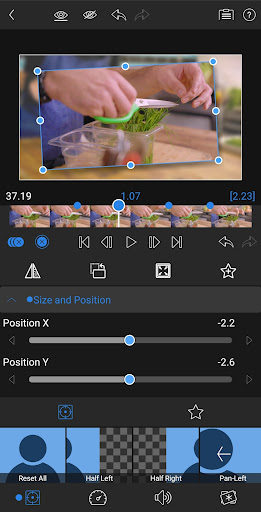
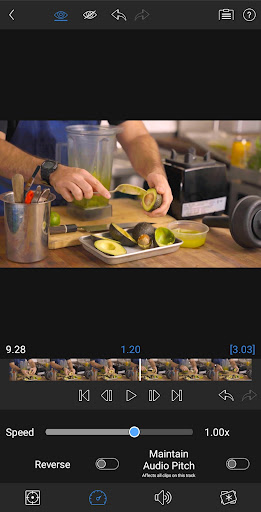
About LumaFusion: Pro Video Editing
Welcome to LumaFusion! The gold standard for storytellers worldwide. Offering a fluid, intuitive, touch-screen editing experience.
PROFESSIONAL EDITING MADE EASY
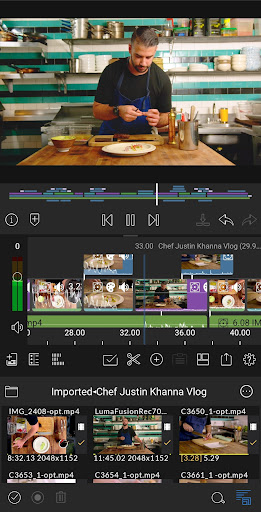
• Six video-with-audio or graphic tracks: Create multiple layer edits with smooth handling of media up to 4K.
• Six additional audio only tracks: Build your soundscape.
• The ultimate Timeline: Fluent editing using the world’s most flexible track-based AND magnetic timeline.
• Loads of transitions: Keep your story moving.
• Dex Mode capabilities: See your work on a big screen.
• Markers, tags, and notes: Stay organized.
• Voiceover: Record VO while playing your movie.
• Track height adjustment: View your timeline at its best for any device.
LAYERED EFFECTS AND COLOR CORRECTION
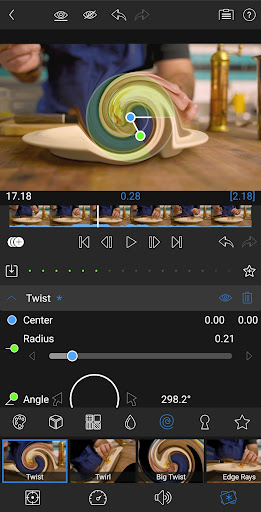
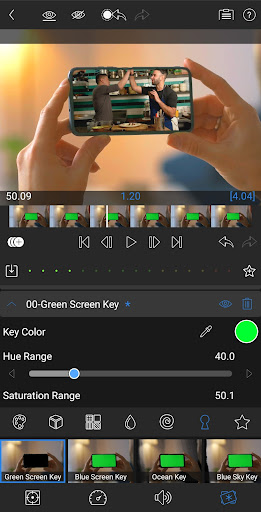
• Green screen, luma, and chroma keys: For creative compositing.
• Powerful color correction tools: Create your own look.
• Video Waveform, vector and histogram scopes.
• LUT: Import and apply .cube or .3dl LUTs for pro color.
• Unlimited keyframes: Animate effects with precision.
• Customizable text and effect presets: Save and share your favorite animations and looks.
ADVANCED AUDIO CONTROL
• Graphic EQ and Parametric EQ: Fine-tune audio.
• Keyframe audio levels, panning, and EQ: Craft seamless mixes.
• Stereo and Dual-mono audio support: For interviews with multiple mics on one clip.
• Audio Ducking: Balance your music and dialogue.
CREATIVE TITLES AND MULTILAYER TEXT
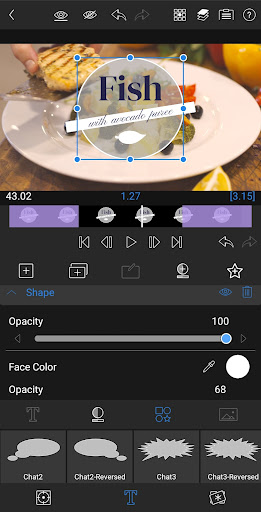
• Multilayer titles: Combine shapes, images, and text into your graphic.
• Customizable fonts, colors, borders, and shadows: Design eye-catching titles.
• Import custom fonts: Strengthen your brand.
• Save and share title presets: Perfect for collaboration.
PROJECT FLEXIBILITY AND MEDIA LIBRARY
• Aspect ratios for all uses: From widescreen cinema to social media.
• Project Frame rates from 18fps to 240fps: Flexibility for any workflow.
• Edit from the Media library and directly from USB-C drives: Access your content wherever it is.
• Import media from cloud storage: Wherever you store it.
SHARE YOUR MASTERPIECES
• Control resolution, quality, and format: Share movies effortlessly.
• Export destinations: Share movies to social media, local storage or cloud storage.
• Edit on multiple devices: Seamlessly transfer projects.
SPEED RAMPING AND ENHANCED KEYFRAMING (available as a single, one-time, in-app purchase or as part of the optional Creator Pass).
• Speed Ramping: Addeye-catching effects to on-screen motion.
• Bézier curves: Move titles, graphics and clips in a natural curved path.
• Ease in and out of any keyframe: Come to a gentle stop with this easy-to-use feature.
• Move Keyframes: Adjust your timing even after you’ve placed your keyframes.
• Zoom in and out of your Preview for precision when animating.
CREATOR PASS SUBSCRIPTION
• Get full access to Storyblocks for LumaFusion: Millions of High-quality royalty-free music, SFX, and videos, PLUS get Speed Ramping and Keyframing as part of the subscription.
EXCEPTIONAL FREE SUP
Frequently Asked Questions
Is LumaFusion: Pro Video Editing free?
No, LumaFusion: Pro Video Editing costs $29.99. It offers in-app purchases.
What is the rating of LumaFusion: Pro Video Editing?
LumaFusion: Pro Video Editing has a 4.3 out of 5 star rating based on 2.8K reviews on the Google Play.
Who made LumaFusion: Pro Video Editing?
LumaFusion: Pro Video Editing was developed by LumaTouch. Visit their website at https://lumatouch.co/support.
Developer
Explore More
Related Video Players & Editors Apps






Share & Embed
Use these badges on your website or blog to link back to this app's data.
Rating Badge
<a href="https://apppricinglab.com/app/google_play/com.luma_touch.lumafusion"><img src="https://apppricinglab.com/api/badge/rating?store=google_play&app=com.luma_touch.lumafusion" alt="LumaFusion: Pro Video Editing rating on App Pricing Lab" /></a>IAP Badge
<a href="https://apppricinglab.com/iap/google_play/com.luma_touch.lumafusion"><img src="https://apppricinglab.com/api/badge/iap?store=google_play&app=com.luma_touch.lumafusion" alt="LumaFusion: Pro Video Editing IAP prices on App Pricing Lab" /></a>Rank Badge
<a href="https://apppricinglab.com/app/google_play/com.luma_touch.lumafusion"><img src="https://apppricinglab.com/api/badge/rank?store=google_play&app=com.luma_touch.lumafusion" alt="LumaFusion: Pro Video Editing ranking on App Pricing Lab" /></a>