
Icon Changer - Customize Icon
▶️ Google PlayPersonalizationFreeIn-App PurchasesContains AdsEveryone
Icon Changer - Customize Icon Price Snapshot
Icon Changer - Customize Icon by ambi mx is free to download on the Google Play, and offers in-app purchases. It holds a 4.6★ rating from 15.0K reviews.
Listing last updated: 2025-11-28. Source: public Google Play data, compiled via the App Pricing Lab methodology.
4.6★
15.0K reviews
1.0M
Installs
Feb 12, 20
Released
2025-11-28
Last Updated
Rankings
| Category | Collection | Rank | Date |
|---|---|---|---|
| PERSONALIZATION | topselling_free | #177 | 2026-03-10 |
Screenshots



About Icon Changer - Customize Icon
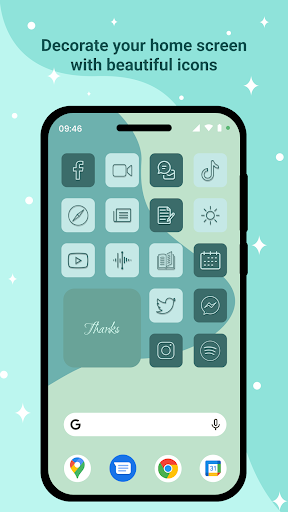
- Icon Changer application is a free application that supports changing the name of the application, changing the icon of the application on the device easily.
Make your phone come alive with optional icon packs available.
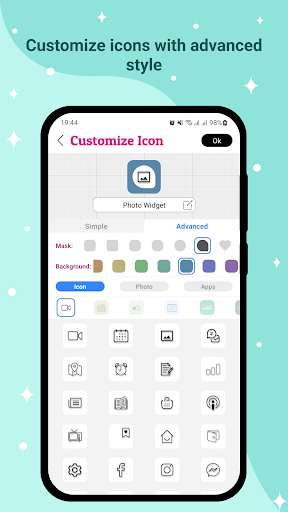
- This application creates a new application icon through a shortcut to the home screen of the device to help users customize it more easily. The application has features that support customizing icons through the Customize Icon screen such as:
✶ Style Simple you can :
+ Choose an icon from the pack available on the app with more than 10 packages available, including an ios style icon pack for those of you who want an ios-like icon experience.
+ Select photo from device or through camera.
+ Select icons from other applications on the device.
+ Use icon packs of third-party applications.
✶Style Advanced 1:
+ This style has all the functionality of the simple style, but will add the ability to select the background and mask the icon. Photos from devices, applications, ... will be minimized in the middle of the icon to create a highlight for the icon.
✶Style Advanced 2:
+ This style has the feature to choose background and mask for icons, change mask color, choose default ion, change icon color. Here the layer mask is mainly for decoration, you can choose not to use it. This style will help you create more beautiful icons yourself than the previous styles, you can unleash your creativity with this style.
- The application works in a simple thread: Go to the Icon Changer application → Find and select the application you want to customize the icon→ Customize Icon as you want → Press the "Ok" button to icon changer for android → Finish changing the Icon, when you can create the icon again or return to the main screen of the application through the "Create next" button.
- If you love this Icon Changer - Customize Icon application, don't forget to leave a review for the application and share it with your friends. Any questions or suggestions you can contact via email: ambimxdev@gmail.com
Frequently Asked Questions
Is Icon Changer - Customize Icon free?
Yes, Icon Changer - Customize Icon is free to download. It offers in-app purchases.
What is the rating of Icon Changer - Customize Icon?
Icon Changer - Customize Icon has a 4.6 out of 5 star rating based on 15.0K reviews on the Google Play.
Who made Icon Changer - Customize Icon?
Icon Changer - Customize Icon was developed by ambi mx. Visit their website at https://ambimxdev.com/.
Developer
Explore More
Related Personalization Apps







Share & Embed
Use these badges on your website or blog to link back to this app's data.
Rating Badge
<a href="https://apppricinglab.com/app/google_play/com.mx.apps.iconchanger.customizeicon"><img src="https://apppricinglab.com/api/badge/rating?store=google_play&app=com.mx.apps.iconchanger.customizeicon" alt="Icon Changer - Customize Icon rating on App Pricing Lab" /></a>IAP Badge
<a href="https://apppricinglab.com/iap/google_play/com.mx.apps.iconchanger.customizeicon"><img src="https://apppricinglab.com/api/badge/iap?store=google_play&app=com.mx.apps.iconchanger.customizeicon" alt="Icon Changer - Customize Icon IAP prices on App Pricing Lab" /></a>Rank Badge
<a href="https://apppricinglab.com/app/google_play/com.mx.apps.iconchanger.customizeicon"><img src="https://apppricinglab.com/api/badge/rank?store=google_play&app=com.mx.apps.iconchanger.customizeicon" alt="Icon Changer - Customize Icon ranking on App Pricing Lab" /></a>