
AirMirror: AirPlay Receiver Price Snapshot
AirMirror: AirPlay Receiver by NeoYantra is priced at $4.99 on the Google Play, with no in-app purchases. It holds a 3.6★ rating from 308 reviews.
Listing last updated: 2024-07-05. Source: public Google Play data, compiled via the App Pricing Lab methodology.
3.6★
308 reviews
10.0K
Installs
Feb 14, 20
Released
2024-07-05
Last Updated
Rankings
| Category | Collection | Rank | Date |
|---|---|---|---|
| VIDEO_PLAYERS | topselling_paid | #20 | 2026-03-10 |
Screenshots


About AirMirror: AirPlay Receiver
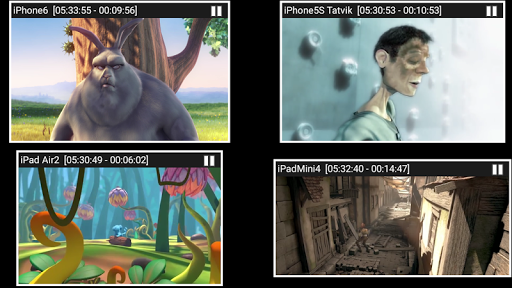
AirMirror is Receiver App on Android for Screen Mirroring and Casting from Apple devices. An Apple device can be an iPhone, an iPad, a MacBook or a iMac. Using AirMirror Receiver, the Android device can mirror screen of an Apple device or can playback audio/video/photos stored on Apple device or can play YouTube video link from Apple device over the local network. This is highly useful for sharing the screen and content of Apple device with family, friends, colleagues, customers or business partners.
Features:
-------------
o Mirroring of Screen of Apple Devices (iOS version 9 to 15).
o Mirror/cast from up to 4 Apple devices simultaneously.
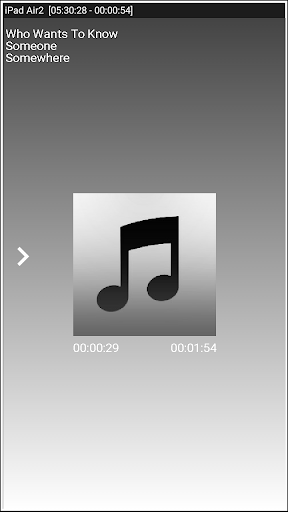
o Playback of Apple device’s media content.
o Slideshow of photos, images and videos of Apple device.
o Restrict unauthorized user from sharing his Apple device using passcode feature.
o Playback of YouTube free content from Apple device to AirMirror receiver.
o Resize and move the mirroring/casting window in the App view.
o Share game screen while playing game on Apple device.
o Share game screen while playing game on Apple device.
o Bluetooth Low Energy based advertising to mirror devices across different subnets.
Instructions of using AirMirror App:
1. Launch AirMirror App on Android Device. The App will start advertising Android Device as a Receiver to screen mirror an Apple Device. The default name of the Receiver is Android Device’s name.
2. On Apple Device, enable Screen Mirroring and select AirMirror Receiver's name from the list. Enable Mirroring using the slider. The Apple device should be in the same network as the Android Device.
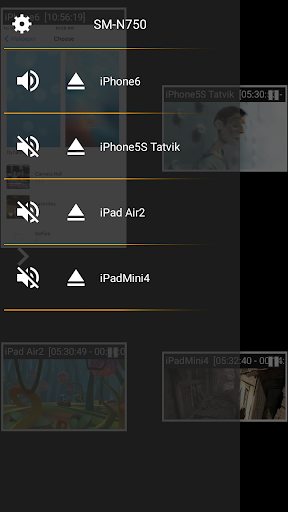
3. On AirMirror App, the list of Apple devices connected to the App are shown in semi transparent control-screen which slides out on touching ">". For unhindered mirroring, slide control -screen to left by swiping it to left or by touching outside the control-screen.
4. One can disconnect Apple device and mute/unmute the mirroring/casting by touching mirroring window in the App for about two seconds, or by going to control screen and perform disconnect and mute/unmute.
5. Touching Settings icon on the control-screen, the user can navigate to Settings, where user can rename AirMirror Receiver's name, enable/disable password for authentication, toggle AirMirror Receiver discovery to on/off, change quality of mirroring, set YouTube bandwidth, or reset to default settings.
Known Limitation:
1. The app does not work with DRM protected content like Netflix, paid iTunes videos, paid Google Movies etc.
2. App has limited capability for Live TV from only some Apps or websites.
You may reach us at sales@neoyantra.com.
Disclaimer: Apple, iPhone, iPad, MacBook, iMac, Airplay, iTunes, YouTube, NetFlix, Google, Android etc. are trademarks/tradenames of their respective owners. We do not have any association with Apple or Google or any other entity.
Frequently Asked Questions
Is AirMirror: AirPlay Receiver free?
No, AirMirror: AirPlay Receiver costs $4.99.
What is the rating of AirMirror: AirPlay Receiver?
AirMirror: AirPlay Receiver has a 3.6 out of 5 star rating based on 308 reviews on the Google Play.
Who made AirMirror: AirPlay Receiver?
AirMirror: AirPlay Receiver was developed by NeoYantra. Visit their website at http://www.neoyantra.com.
Developer
Explore More
Related Video Players & Editors Apps






Share & Embed
Use these badges on your website or blog to link back to this app's data.
Rating Badge
<a href="https://apppricinglab.com/app/google_play/com.neoyantra.airplaymirror.airplaymirrorapp"><img src="https://apppricinglab.com/api/badge/rating?store=google_play&app=com.neoyantra.airplaymirror.airplaymirrorapp" alt="AirMirror: AirPlay Receiver rating on App Pricing Lab" /></a>Rank Badge
<a href="https://apppricinglab.com/app/google_play/com.neoyantra.airplaymirror.airplaymirrorapp"><img src="https://apppricinglab.com/api/badge/rank?store=google_play&app=com.neoyantra.airplaymirror.airplaymirrorapp" alt="AirMirror: AirPlay Receiver ranking on App Pricing Lab" /></a>