
Calibre Sync Price Snapshot
Calibre Sync by BIL studio is priced at $5.49 on the Google Play, with no in-app purchases. It holds a 3.3★ rating from 402 reviews.
Listing last updated: 2025-04-01. Source: public Google Play data, compiled via the App Pricing Lab methodology.
3.3★
402 reviews
10.0K
Installs
Apr 13, 20
Released
2025-04-01
Last Updated
Rankings
| Category | Collection | Rank | Date |
|---|---|---|---|
| BOOKS_AND_REFERENCE | topselling_paid | #23 | 2026-03-10 |
Screenshots


About Calibre Sync
Lifetime support, no extra charge, no subscription fee.
Calibre Sync can:
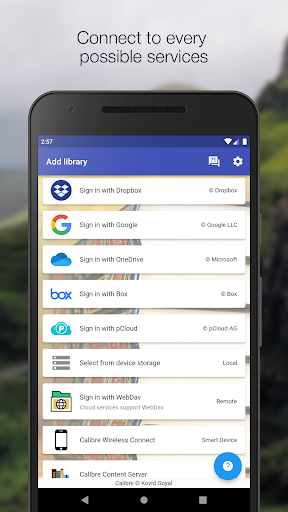
- help you access full Calibre libraries on most popular personal cloud services, including Google Drive, Dropbox, Microsoft OneDrive, Box, pCloud, MEGA, WebDav, Nextcloud and OwnCloud - simply the most supported for cloud services.
- transform your device to a smart device emulator that connects to Calibre wirelessly. It even supports Calibre libraries on your external storage and from Calibre Content Server with amazing performance.
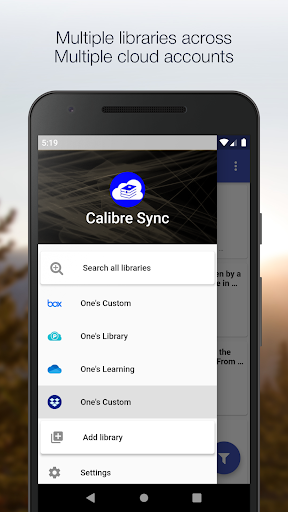
Move your Calibre libraries to your favourite cloud providers and access those libraries via Calibre Sync to browse, sort, search, download and read books on your device. Calibre Sync also supports multiple libraries across multiple Drive, Dropbox, OneDrive, Box, pCloud, MEGA, WebDav, Nextcloud, and OwnCloud accounts simultaneously.
Features:
- Unlimited Calibre libraries
- Wireless connect to Calibre effortlessly as Smart device
- Easy switch between multiple libraries across multiple accounts
- Automatic check and update libraries when launching the app
- Pull, Refresh or Remove a library from Calibre Sync
- Support different book list layouts: List - detailed and simple, Grid, and Carousel
- View your library statistics
- Search across all of your available libraries
- Search books by title, authors, and even in comments and custom columns
- Filter books on authors, series, tags, language, publishers, formats and in custom columns
- Sort libraries by title, author, ratings, and several Date options - ascending and descending
- Filter downloaded books
- Configuration for each library download location
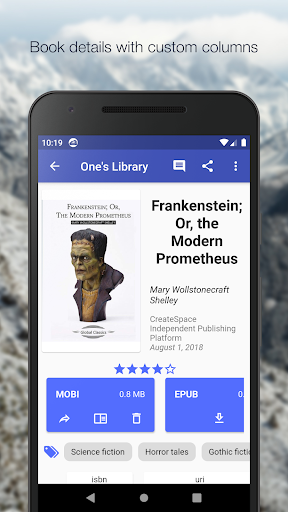
- Support for custom columns in book details view
- Quick access to book download and share via slideable list view
- Zoom the book cover
- Support "swipe from book to book" in book details view
- Email or share a copy of downloaded book
- Open downloaded book in your book reader application to read a book
- View the file size of each book format
- Show book identifiers and link to source (like ISBN, Amazon, Google Books, Goodreads, etc)
- Dark/light themes
- And many more features ...
To move your Calibre library to cloud services:
1) Open Calibre on your Laptop/PC/Desktop
2) Select "Switch/create library..." from the Calibre menu
3) Select an empty folder on your Cloud drive in "New Location" drop down
4) Select "Move current library to new location", then press OK
5) Wait for cloud sync to complete.
6) Then you are ready to use Calibre Sync.
To move your Calibre library to your phone storage, just copy the library directory to your phone storage.
Notes:
- Calibre Sync is not a reader app. You must install and use one of the many excellent reader apps available.
- Only Microsoft OneDrive for Personal accounts (shared) are supported. Please email us if you observe any inconsistencies.
- Due to restriction in Box API, Calibre Sync must acquire write permission in order to download files, download is not a read action on Box. Calibre Sync
Frequently Asked Questions
Is Calibre Sync free?
No, Calibre Sync costs $5.49.
What is the rating of Calibre Sync?
Calibre Sync has a 3.3 out of 5 star rating based on 402 reviews on the Google Play.
Who made Calibre Sync?
Calibre Sync was developed by BIL studio. Visit their website at https://calibresync.bitbucket.io/.
Developer
Explore More
Related Books & Reference Apps






Share & Embed
Use these badges on your website or blog to link back to this app's data.
Rating Badge
<a href="https://apppricinglab.com/app/google_play/com.trucnguyen.calibresync"><img src="https://apppricinglab.com/api/badge/rating?store=google_play&app=com.trucnguyen.calibresync" alt="Calibre Sync rating on App Pricing Lab" /></a>Rank Badge
<a href="https://apppricinglab.com/app/google_play/com.trucnguyen.calibresync"><img src="https://apppricinglab.com/api/badge/rank?store=google_play&app=com.trucnguyen.calibresync" alt="Calibre Sync ranking on App Pricing Lab" /></a>