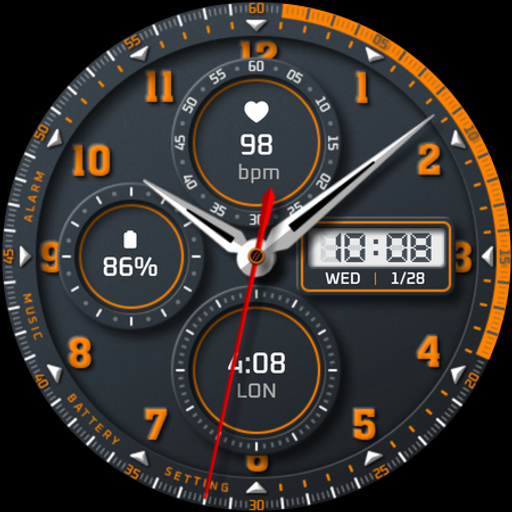
Watch face 10h08.com #111 Price Snapshot
Watch face 10h08.com #111 by 10h08.com - Wear Os Watch Face is priced at $0.99 on the Google Play, with no in-app purchases. It holds a 4.2★ rating from 30 reviews.
Listing last updated: 2026-01-07. Source: public Google Play data, compiled via the App Pricing Lab methodology.
4.2★
30 reviews
1.0K
Installs
Jan 7, 202
Released
2026-01-07
Last Updated
Rankings
| Category | Collection | Rank | Date |
|---|---|---|---|
| PERSONALIZATION | topselling_paid | #136 | 2026-03-10 |
Screenshots


About Watch face 10h08.com #111
⌚️ Watch face 10h08.com #111
User manual:
1. The watch face only works for devices running Wear OS 5 or later
Check in Watch settings - Watch info - Software info - Wear OS version
2. Your weather shows "?". Open Galaxy Wearable app - Watch settings - Apps - Find Weather app and open it - Settings - Enable location, local, adjust units,...
* With Wear OS 6 and One UI 8 or later, please open the Weather app on your watch, then tap settings to configure.
3. How to turn on Simple AOD mode? Customize watch face and select menu:
- AOD simple background: select option 2 to enable black background
- AOD simple hands style: select option 2 or 3 to choose the hand style
- AOD simple index style: select option 2 or 3 to choose the index ring
🟥 Information:
- High resolution, sharp images
- Classic and elegant design
- Analog time
- Day, date
- Heart rate
- World clock
- Battery level
- 3 complications: heart rate, world clock, battery level
- 5 watch hand styles
- The seconds hand of a stopwatch
- Full AOD or 4 minimalist AOD styles (please read the user manual)
- 30 themes color palette (video available on Google Play Store)
🟨 How to custom this watch face?
1. Press and hold watch face screen
2. Tap “Customize” button
3. Swipe left or right, up or down to customize watch face
🟦 How to install watch face on your watch?
1. Install watch face from Google Play store
2. Press and hold watch face screen
3. Swipe right to left and tap “Add watch face”
4. Scroll to the bottom of the page and selectwatch face in the “downloaded” section
🟧 Compatible with smart watches running Wear OS 5+ SDK 34+
For example: Galaxy Watch 6, Galaxy Watch 7 Ultra, Ticwatch Pro 5, Pixcel Watch 2, Watch 2 Pro,...
🟩 See all my watch faces: https://play.google.com/store/apps/dev?id=5487081600241990978
🟪 Follow my social media pages for the latest watch face updates:
https://10h08.com
https://facebook.com/10h08
Frequently Asked Questions
Is Watch face 10h08.com #111 free?
No, Watch face 10h08.com #111 costs $0.99.
What is the rating of Watch face 10h08.com #111?
Watch face 10h08.com #111 has a 4.2 out of 5 star rating based on 30 reviews on the Google Play.
Who made Watch face 10h08.com #111?
Watch face 10h08.com #111 was developed by 10h08.com - Wear Os Watch Face.
Developer
Explore More
Related Personalization Apps







Share & Embed
Use these badges on your website or blog to link back to this app's data.
Rating Badge
<a href="https://apppricinglab.com/app/google_play/com.watchfacestudio.wf10h08com111"><img src="https://apppricinglab.com/api/badge/rating?store=google_play&app=com.watchfacestudio.wf10h08com111" alt="Watch face 10h08.com #111 rating on App Pricing Lab" /></a>Rank Badge
<a href="https://apppricinglab.com/app/google_play/com.watchfacestudio.wf10h08com111"><img src="https://apppricinglab.com/api/badge/rank?store=google_play&app=com.watchfacestudio.wf10h08com111" alt="Watch face 10h08.com #111 ranking on App Pricing Lab" /></a>