
Folder Widget - Large Folders
▶️ Google PlayPersonalizationFreeIn-App PurchasesContains AdsEveryone
Folder Widget - Large Folders Price Snapshot
Folder Widget - Large Folders by automan is free to download on the Google Play, and offers in-app purchases. It holds a 3.5★ rating from 2.9K reviews.
Listing last updated: 2026-02-24. Source: public Google Play data, compiled via the App Pricing Lab methodology.
3.5★
2.9K reviews
1.0M
Installs
Jan 11, 20
Released
2026-02-24
Last Updated
Rankings
| Category | Collection | Rank | Date |
|---|---|---|---|
| PERSONALIZATION | topgrossing | #194 | 2026-03-10 |
Screenshots
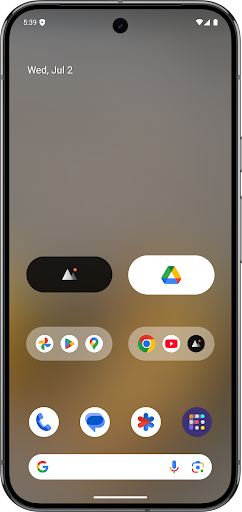


About Folder Widget - Large Folders
Large Folders makes your phone’s launcher home screen easy to navigate by organizing apps into one Large Folder or Large Icon and quickly accessing the corresponding app without even opening that app folder in the first place. You can enter the large folder with a touch on the lower right corner of the folder.
Features:
- Rich configuration options
- Support hiding folder name
- Support kind of shortcuts, such as quick system settings, in-app shortcuts, files, folders, web page, activities, accessibility shortcuts, custom schema, shell and popup widget
- Kind of folder widget struct type, 2x2, 3x3, 4x4, 3+4, 1x5, 2x3, 3x2, MxN(cutstom), MxN(Scroll), Circle and more
- Custom widget size, background color, radius, margins, paddings
- Custom folder name, text color, text size, text paddings
- Custom folder grid size and icon name visibility
- Support change notification dot number styles
- Vertical scrollable inside the folder box
- Adaptive icon shape
- Support icon pack and mask
- Auto-dark folder background
- Shadow option of folder name
Popup widget- Select one or more pop-up widgets to place in a large folder or icon on the home screen launcher
File/Folders - select the file or folder path as the quickest way to open it
Accessibility shortcuts - includes quick Home, Back, Recent, Power menu, Take screenshot(Android P+), One-key Lock screen(Android P+) and more
Activities- activity screen list of all installed apps
Web page - use any URL as a separate page that can be opened quickly
Schema - jump to a specific page using a more advanced schema
Shell - command execution
If you have any questions or suggestions, please contact me by email to hanks.xyz@gmail.com
Frequently Asked Questions
Is Folder Widget - Large Folders free?
Yes, Folder Widget - Large Folders is free to download. It offers in-app purchases.
What is the rating of Folder Widget - Large Folders?
Folder Widget - Large Folders has a 3.5 out of 5 star rating based on 2.9K reviews on the Google Play.
Who made Folder Widget - Large Folders?
Folder Widget - Large Folders was developed by automan. Visit their website at https://hanks.pub/folder-widget.
Developer
Explore More
Related Personalization Apps








Share & Embed
Use these badges on your website or blog to link back to this app's data.
Rating Badge
<a href="https://apppricinglab.com/app/google_play/pub.hanks.appfolderwidget"><img src="https://apppricinglab.com/api/badge/rating?store=google_play&app=pub.hanks.appfolderwidget" alt="Folder Widget - Large Folders rating on App Pricing Lab" /></a>IAP Badge
<a href="https://apppricinglab.com/iap/google_play/pub.hanks.appfolderwidget"><img src="https://apppricinglab.com/api/badge/iap?store=google_play&app=pub.hanks.appfolderwidget" alt="Folder Widget - Large Folders IAP prices on App Pricing Lab" /></a>Rank Badge
<a href="https://apppricinglab.com/app/google_play/pub.hanks.appfolderwidget"><img src="https://apppricinglab.com/api/badge/rank?store=google_play&app=pub.hanks.appfolderwidget" alt="Folder Widget - Large Folders ranking on App Pricing Lab" /></a>