
ILLUMINATOR Hybrid-LCD Price Snapshot
ILLUMINATOR Hybrid-LCD by WatchBase is priced at $1.99 on the Google Play, with no in-app purchases. It holds a 4.1★ rating from 607 reviews.
Listing last updated: 2025-10-29. Source: public Google Play data, compiled via the App Pricing Lab methodology.
4.1★
607 reviews
10.0K
Installs
May 17, 20
Released
2025-10-29
Last Updated
Rankings
| Category | Collection | Rank | Date |
|---|---|---|---|
| PERSONALIZATION | topselling_paid | #24 | 2026-03-10 |
| PERSONALIZATION | topgrossing | #124 | 2026-03-10 |
Screenshots
About ILLUMINATOR Hybrid-LCD
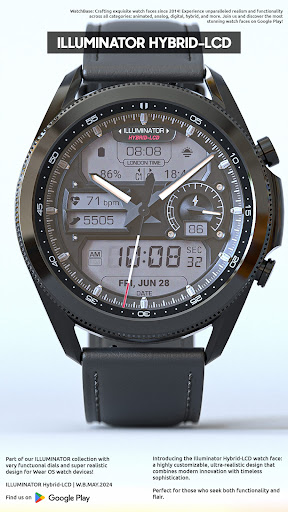
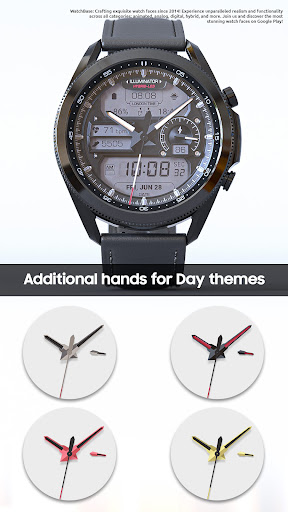
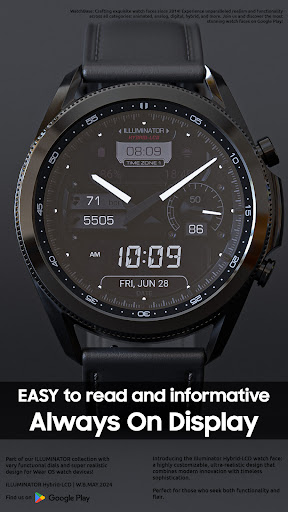
Ultra-realistic, highly customizable, and easy to read, this Illuminator-hybrid style watch face for Wear OS features 2 custom complications and beautiful night modes.
NOTE: Please read the how to section and installation section and check out the images !!!
ⓘ Features:
- Realistic design.
- Hybrdid-LCD watch.
- 4 (four) custom complications. * (IMPORTANT Read the Complicaiton Section below)
- Auto 12h/24h mode.
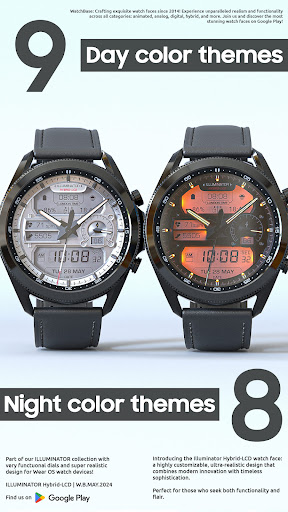
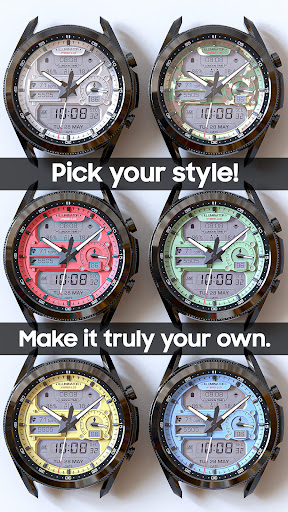
- 9 (nine) different Day themes.
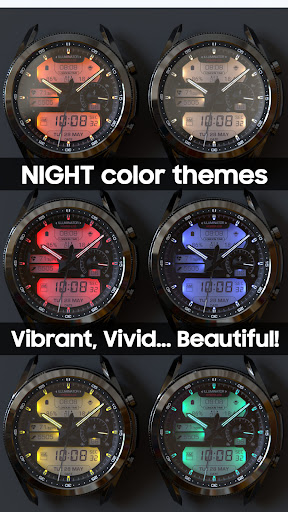
- 8 (eight) different Night themes.
- 5 (five) hands for Day mode.
- Hear rate indicator (LCD).
- Steps indicator (LCD).
- London time.
- Time and date.
- Battery indicator.
- AM/PM indicator (LCD).
- Alway On Display.
- Three color themes for AOD.
- Three AOD hands colors.
ⓘ How to:
- To customize (chnage themes style) your watch face, touch and hold on the screen, then tap on customize.
- AOD (Always On Display) themes/hands. To change the AOD theme and/or hands select the second/first option in the "AOD Normal/Blue" and/or "AOD hands White/Blue".
ⓘ NIGHT themes How to:
-If you activate night themes and want to switch back to the day theme, simply go to the customization menu and select the first option under 'Night Color Themes' to turn it off. This is because night themes overlay day themes when activated.
* Preview for the AOD theme and Hands color might not be visible due to the way customizations work.
Don't miss out our top REALISTIC watch faces:
Milirary ZULU Tactical - https://play.google.com/store/apps/details?id=wb.military.zulu
Moon Master PRO - https://play.google.com/store/apps/details?id=wb.moon.master
ⓘ Installation
How to install: https://watchbase.store/static/ai/
After installation: https://watchbase.store/static/ai/ai.html
* Luna Benedicta watch face shown in "How to install" and "After installation". The same installation process is valid for all of our watch faces.
If you have any issues installing the watch face, please note that we have no control over the installation process.
In order to apply the watch face after you install it, touch and hold on the main screen (your current watch face) the swipe left to look for it. If you can't see it, tap on the " + " sign at the end (add a watch face) and find our watch face there.
We use a companion app for the phone to make the installation process easier. If you buy our watch face, tap on the install button (on the phone app) you must check your watch.. a screen will appear with the watch face.. tap install again and wait for the installation to finish. If you already bought the watch face and it still asks you to buy it again on the watch, don't worry you will not be charged twice. This is a common synchronization issue, just wait a little or try to restart your watch.
ⓘ Note: If you encounter any issues during installation, please contact our support team for assistance at support@belvek.com
ⓘ Complications:
- Illuminator Hybrid-LCD offers two compication located in the upper LCD screen on the left and right side. T
Frequently Asked Questions
Is ILLUMINATOR Hybrid-LCD free?
No, ILLUMINATOR Hybrid-LCD costs $1.99.
What is the rating of ILLUMINATOR Hybrid-LCD?
ILLUMINATOR Hybrid-LCD has a 4.1 out of 5 star rating based on 607 reviews on the Google Play.
Who made ILLUMINATOR Hybrid-LCD?
ILLUMINATOR Hybrid-LCD was developed by WatchBase.
Developer
Explore More
Related Personalization Apps







Share & Embed
Use these badges on your website or blog to link back to this app's data.
Rating Badge
<a href="https://apppricinglab.com/app/google_play/wb.illuminator.hybridlcd"><img src="https://apppricinglab.com/api/badge/rating?store=google_play&app=wb.illuminator.hybridlcd" alt="ILLUMINATOR Hybrid-LCD rating on App Pricing Lab" /></a>Rank Badge
<a href="https://apppricinglab.com/app/google_play/wb.illuminator.hybridlcd"><img src="https://apppricinglab.com/api/badge/rank?store=google_play&app=wb.illuminator.hybridlcd" alt="ILLUMINATOR Hybrid-LCD ranking on App Pricing Lab" /></a>