
Piano - Simple Piano Recording Price Snapshot
Piano - Simple Piano Recording by Seiji Hashizume is free to download on the Apple App Store, with no in-app purchases. It holds a 4.5★ rating from 2.6K reviews.
Listing last updated: 2026-01-02. Source: public Apple App Store data, compiled via the App Pricing Lab methodology.
4.5★
2.6K reviews
2017-12-18
Released
2026-01-02
Last Updated
Rankings
| Category | Collection | Rank | Date |
|---|---|---|---|
| MUSIC | top-free-ipad | #148 | 2026-03-12 |
Screenshots
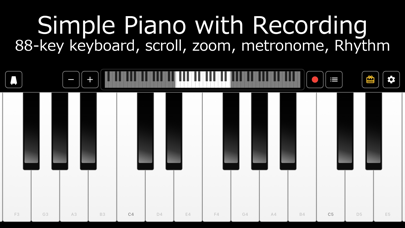
About Piano - Simple Piano Recording
◆ Play Like a Real Piano with 88 Keys
Play a full 88-key piano on your smartphone or tablet, just like a grand piano. Simply tap to create beautiful piano sounds - no musical experience required.
Adjust the key size to fit small hands for children or full-size practice for adults. Scroll quickly to access all 88 keys.
◆ Enjoy 128 Different Instruments
Not just piano! Easily switch to your favorite instrument in settings.
[128 Instrument Sounds]
• Piano: Grand Piano, Electric Piano, Harpsichord
• Organ: Church Organ, Rock Organ, Accordion
• Guitar: Acoustic Guitar, Electric Guitar
• Strings: Violin, Cello, String Ensemble
• Brass: Trumpet, Trombone, French Horn
• Percussion: Music Box, Vibraphone, Marimba, Xylophone
• Others: Bass, Harmonica, and more
Find your favorite sound and enjoy your original performance.
◆ Record and Track Your Progress
Record your performances and play them back anytime. Listening to yourself objectively helps you feel your improvement and stay motivated.
Save multiple recordings to track your daily practice progress.
◆ Practice with Metronome & Rhythm
[Metronome]
• Freely set BPM from 20 to 240
• Supports 2/4, 3/4, 4/4, 6/8 time signatures
• Practice with accurate tempo
[8 Rhythm Patterns]
• 8 Beat (Rock)
• 16 Beat (Funk)
• 4 on the Floor (EDM)
• Jazz Swing
• Bossa Nova
• Samba
• Reggae
• Shuffle (Blues)
Play along with drums for a band-like experience! Practice is fun even when you're alone.
◆ 8 Color Themes to Match Your Style
• Classic (standard black & white)
• Matcha
• Sakura
• Chocolate
• Indigo
• Halloween
• Christmas
• Ocean
Change the keyboard colors to match the season or your mood.
◆ Note Labels for Beginners
Display note names on the keys:
• CDEFGAB (Western notation)
• Do Re Mi (Solfège)
• No labels
Even if you struggle reading sheet music, note labels make playing easy.
◆ Perfect For
• Those who want to try before taking piano lessons
• Playing during commute or travel
• Parents teaching children the joy of music
• Songwriting and arrangement ideas
• Stress relief through music
• Anyone looking for a simple keyboard app
◆ Additional Features
• Silent mode support: Play sounds even in silent mode
• 14 languages supported: Available worldwide
• Ad-free option: Watch a video to hide banner ads for 3 days
• Simple, intuitive design: Easy for anyone to use
◆ Free to Enjoy
All basic features are free. Download and start playing right away.
Start your musical journey today!
◆ Contact Us
If you have any feedback or requests, please contact us through the app settings. We look forward to hearing from you.
Frequently Asked Questions
Is Piano - Simple Piano Recording free?
Yes, Piano - Simple Piano Recording is free to download.
What is the rating of Piano - Simple Piano Recording?
Piano - Simple Piano Recording has a 4.5 out of 5 star rating based on 2.6K reviews on the Apple App Store.
Who made Piano - Simple Piano Recording?
Piano - Simple Piano Recording was developed by Seiji Hashizume. Visit their website at https://zumec.app/.
Developer
Explore More
Related Music Apps


Share & Embed
Use these badges on your website or blog to link back to this app's data.
Rating Badge
<a href="https://apppricinglab.com/app/apple/1325615259"><img src="https://apppricinglab.com/api/badge/rating?store=apple&app=1325615259" alt="Piano - Simple Piano Recording rating on App Pricing Lab" /></a>Rank Badge
<a href="https://apppricinglab.com/app/apple/1325615259"><img src="https://apppricinglab.com/api/badge/rank?store=apple&app=1325615259" alt="Piano - Simple Piano Recording ranking on App Pricing Lab" /></a>