
Tenuto Price Snapshot
Tenuto by musictheory.net is priced at $4.99 on the Apple App Store, with no in-app purchases. It holds a 4.7★ rating from 633 reviews.
Latest IAP data: 2026-03-21. Listing last updated: 2025-12-08. Source: public Apple App Store data, compiled via the App Pricing Lab methodology.
4.7★
633 reviews
2011-08-30
Released
2025-12-08
Last Updated
Rankings
| Category | Collection | Rank | Date |
|---|---|---|---|
| BOOKS | top-paid | #39 | 2026-09-26 |
| BUSINESS | top-paid | #39 | 2026-09-26 |
| DEVELOPER_TOOLS | top-paid | #39 | 2026-09-26 |
| EDUCATION | top-paid | #39 | 2026-09-26 |
| ENTERTAINMENT | top-paid | #39 | 2026-09-26 |
| FINANCE | top-paid | #39 | 2026-09-26 |
| FOOD_AND_DRINK | top-paid | #39 | 2026-09-26 |
| GAMES | top-paid | #39 | 2026-09-26 |
| GRAPHICS_AND_DESIGN | top-paid | #39 | 2026-09-26 |
| HEALTH_AND_FITNESS | top-paid | #39 | 2026-09-26 |
| LIFESTYLE | top-paid | #39 | 2026-09-26 |
| MEDICAL | top-paid | #39 | 2026-09-26 |
| MUSIC | top-paid | #39 | 2026-09-26 |
| NEWS | top-paid | #39 | 2026-09-26 |
| PHOTO_AND_VIDEO | top-paid | #39 | 2026-09-26 |
| PRODUCTIVITY | top-paid | #39 | 2026-09-26 |
| REFERENCE | top-paid | #39 | 2026-09-26 |
| SHOPPING | top-paid | #39 | 2026-09-26 |
| SOCIAL_NETWORKING | top-paid | #39 | 2026-09-26 |
| SPORTS | top-paid | #39 | 2026-09-26 |
| TRAVEL | top-paid | #39 | 2026-09-26 |
| UTILITIES | top-paid | #39 | 2026-09-26 |
| WEATHER | top-paid | #39 | 2026-09-26 |
| BOOKS | top-paid | #21 | 2026-09-25 |
| BUSINESS | top-paid | #21 | 2026-09-25 |
| DEVELOPER_TOOLS | top-paid | #21 | 2026-09-25 |
| EDUCATION | top-paid | #21 | 2026-09-25 |
| ENTERTAINMENT | top-paid | #21 | 2026-09-25 |
| FINANCE | top-paid | #21 | 2026-09-25 |
| FOOD_AND_DRINK | top-paid | #21 | 2026-09-25 |
| GAMES | top-paid | #21 | 2026-09-25 |
| GRAPHICS_AND_DESIGN | top-paid | #21 | 2026-09-25 |
| HEALTH_AND_FITNESS | top-paid | #21 | 2026-09-25 |
| LIFESTYLE | top-paid | #21 | 2026-09-25 |
| MEDICAL | top-paid | #21 | 2026-09-25 |
| MUSIC | top-paid | #21 | 2026-09-25 |
| NAVIGATION | top-paid | #21 | 2026-09-25 |
| NEWS | top-paid | #21 | 2026-09-25 |
| PHOTO_AND_VIDEO | top-paid | #21 | 2026-09-25 |
| PRODUCTIVITY | top-paid | #21 | 2026-09-25 |
| REFERENCE | top-paid | #21 | 2026-09-25 |
| SHOPPING | top-paid | #21 | 2026-09-25 |
| SOCIAL_NETWORKING | top-paid | #21 | 2026-09-25 |
| SPORTS | top-paid | #21 | 2026-09-25 |
| TRAVEL | top-paid | #21 | 2026-09-25 |
| UTILITIES | top-paid | #21 | 2026-09-25 |
| WEATHER | top-paid | #21 | 2026-09-25 |
| BOOKS | top-paid | #21 | 2026-09-24 |
| BUSINESS | top-paid | #21 | 2026-09-24 |
| DEVELOPER_TOOLS | top-paid | #21 | 2026-09-24 |
Ranking History — Top Paid
Best: #25 · Worst: #47 · 6 days tracked
Screenshots
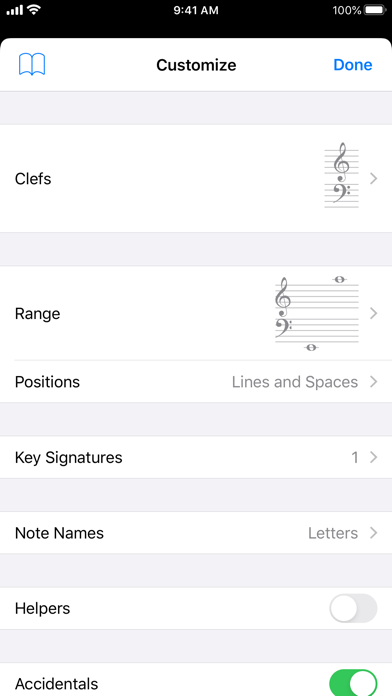
About Tenuto
Tenuto is a collection of 24 highly-customizable exercises designed to enhance your musicality. From recognizing chords on a keyboard to identifying intervals by ear, it has an exercise for you. Tenuto also includes six musical calculators for accidentals, intervals, scales, chords, analysis symbols, and twelve-tone matrices.
A short description of the exercises and calculators follows.
––––––
• Note Identification
• Key Signature Identification
• Interval Identification
• Scale Identification
• Chord Identification
Tap the button corresponding to the written staff line. For example: if shown a C, E, and G with a sharp; tap the "Augmented Triad" button.
––––––
• Note Construction
• Key Signature Construction
• Interval Construction
• Scale Construction
• Chord Construction
Construct the specified label by moving notes and/or adding accidentals. For example: if shown a C and an "Augmented 4th" label, move the second note to F and add a sharp.
––––––
• Keyboard Reverse Identification
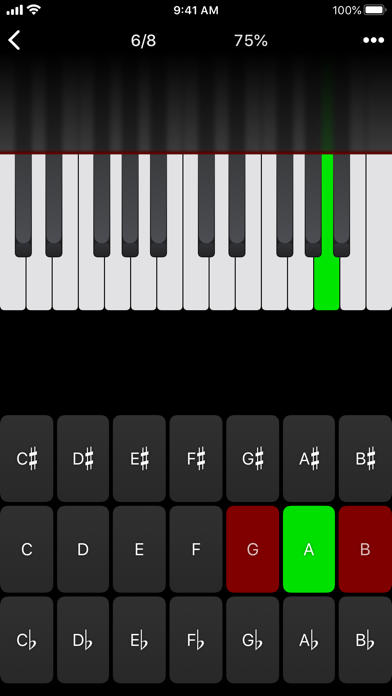
Tap the piano key corresponding to the written note on the staff. While similar to Note Identification, this exercise uses a piano keyboard rather than note name buttons.
• Keyboard Note Identification
• Keyboard Interval Identification
• Keyboard Scale Identification
• Keyboard Chord Identification
Tap the button corresponding to the highlighted piano key(s). If the C and G keys are highlighted, tap the "P5" (Perfect 5th) button.
––––––
• Fretboard Note Identification
• Fretboard Interval Identification
• Fretboard Scale Identification
• Fretboard Chord Identification
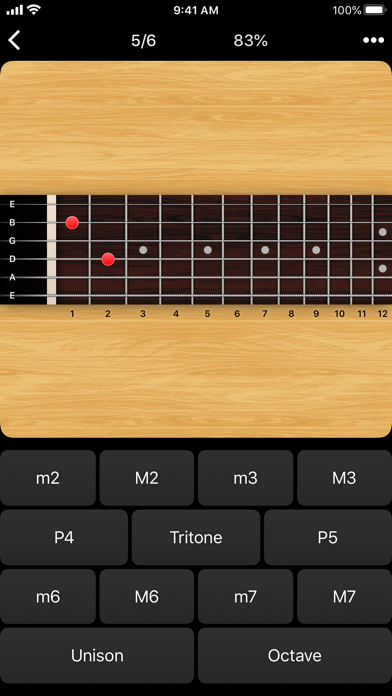
Tap the button corresponding to the marked fretboard position(s). If the 2nd fret of the D string is marked, tap the "E" button.
––––––
• Keyboard Ear Training
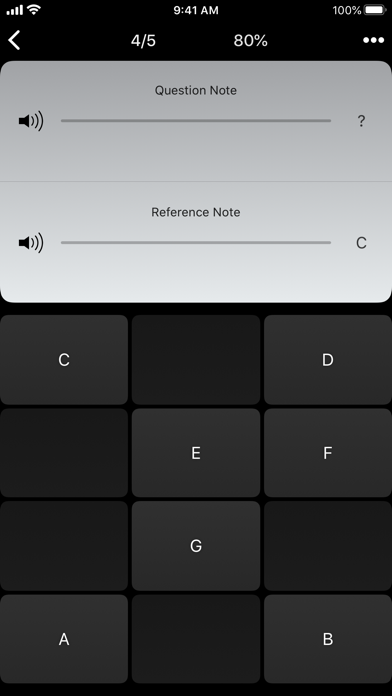
• Note Ear Training
Listen to the played reference and question notes. Select the piano key or note button corresponding to the question note.
• Interval Ear Training
• Scale Ear Training
• Chord Ear Training
Tap the button corresponding to the played notes. If E and F are played, tap the "Minor 2nd" button.
––––––
• Accidental Calculator
Display the accidental for a note and key.
• Interval Calculator
Display the interval for a note, type, and key.
• Chord Calculator
Display the scale for a tonic and scale type.
• Chord Calculator
Display the chord for a note, type, and key.
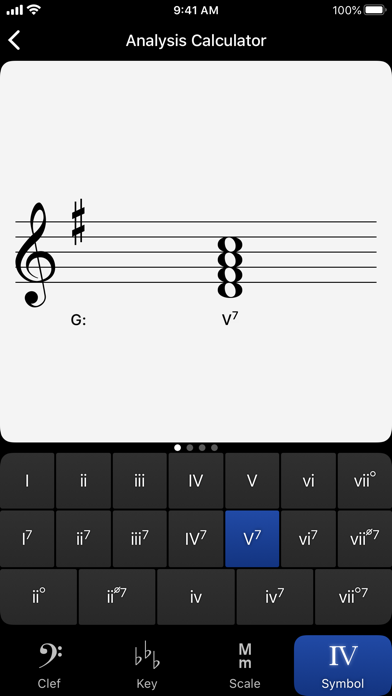
• Analysis Calculator
Display the chord for a symbol and key.
• Matrix Calculator
Display the twelve-tone matrix for a specified tone row.
Frequently Asked Questions
Is Tenuto free?
No, Tenuto costs $4.99.
What is the rating of Tenuto?
Tenuto has a 4.7 out of 5 star rating based on 633 reviews on the Apple App Store.
Who made Tenuto?
Tenuto was developed by musictheory.net. Visit their website at https://apps.apple.com/us/developer/musictheory-net/id459313479?uo=2.
Developer
Explore More
Compare Tenuto with...
 Tenuto vs Love Island USA
 Tenuto vs ALO
 Tenuto vs Peacock TV: Stream TV & Movies
 Tenuto vs Kalshi: Trade Football & more
 Tenuto vs MapQuest GPS Navigation & Maps
 Tenuto vs Capital One Mobile
Related GAMES Apps


Share & Embed
Use these badges on your website or blog to link back to this app's data.
Rating Badge
<a href="https://apppricinglab.com/app/apple/459313476"><img src="https://apppricinglab.com/api/badge/rating?store=apple&app=459313476" alt="Tenuto rating on App Pricing Lab" /></a>Rank Badge
<a href="https://apppricinglab.com/app/apple/459313476"><img src="https://apppricinglab.com/api/badge/rank?store=apple&app=459313476" alt="Tenuto ranking on App Pricing Lab" /></a>