DWG FastView-CAD Viewer&Editor
▶️ Google PlayProductivityFreeIn-App PurchasesContains AdsEveryone
DWG FastView-CAD Viewer&Editor Price Snapshot
DWG FastView-CAD Viewer&Editor by Gstarsoft Co., Ltd. is free to download on the Google Play, and offers in-app purchases. It holds a 3.6★ rating from 98.3K reviews.
Listing last updated: 2026-03-10. Source: public Google Play data, compiled via the App Pricing Lab methodology.
3.6★
98.3K reviews
10.0M
Installs
May 14, 20
Released
2026-03-10
Last Updated
Rankings
| Category | Collection | Rank | Date |
|---|---|---|---|
| PRODUCTIVITY | topgrossing | #183 | 2026-03-10 |
Screenshots




About DWG FastView-CAD Viewer&Editor
★DWG FastView is a #1 CAD APP to view 2D/3D drawing on the go fast.
DWG FastView has over 100 million installs across over 200 countries and regions worldwide.
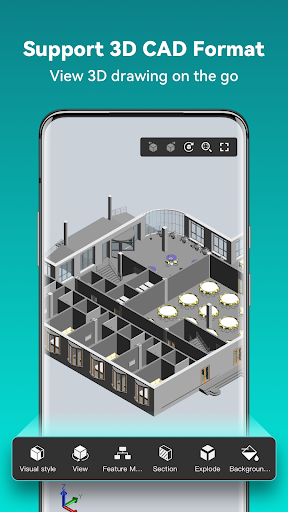
[3D Modeling]: Supports BIM, Revit, Solidworks, NX, CATIA, Inventor, SolidEdge, ACIS, Pro/E, and other mainstream 3D design software models. Supports browsing over 30 formats of 3D drawings, including .rvt/.sldprt/.sldasm/.asm/.prt/.prt.*/.asm.*/.stp/.step.
3D Features include 3D model assembly part preview, scaling, rotation, sectioning, and explosion; 3D measurement (distance measurement between points, lines, and surfaces, arc length, etc.), 3D annotation; PMI display and hiding; free color matching; viewing and multiple views;
DWG FastView is a cross-platform CAD software that meets designers’ demands in all kinds of situation, and fully compatible with DWG, DXF. Various of CAD features such as: Edit, View, Measure, Dimension, Find text, etc. enables you to do real CAD work on the go and enjoy the best mobile CAD experience.
View, Edit, Create & Share all your CAD drawings, synchronize to cloud from multiple devices by one click, enjoy design anytime anywhere together with more than 70 million users around the world.
DWG FastView Highlights
(1) Accurate and fast access your drawings.
•Creating, viewing and editing with easy-to-use advanced tools.
• Supports of AutoCAD all DXF&DWG versions with no file-size limit
• View AutoCAD DWG&DXF file easily.Fully compatibility with AutoCAD.
(2) No registration & Offline drawings.
• Simply download DWG FastView and use it immediately with NO REGISTRATION needed.
• Without internet, you are able to save your masterpieces in the local workspace.
• Drawings from E-mail, Cloud Service or Network Disk like Dropbox, OneDrive, Google Drive, Box or WebDAV can be opened, viewed, edited and shared as well with Internet.
(3) Support export to PDF, BMP, JPG and PNG, and share it to anyone freely.
• Transfer CAD drawings into PDF format and customize its paper size, orientation, color and so on.
•Convert CAD drawings to different versions.
•Convert PDF to DWG.
(4) Do real CAD work on mobile.
• Move, Copy, Rotate, Scale, Color, Measure object, record management results, manage layers and use Layout.
• Advanced drawing and editing tools such as trim, offset, dimension and find text.
•Set precision and display formats of coordinates, distance and angle.
• Zoom in or zoom out a CAD drawing by adjusting the space between two fingers.
• Import or download the CAD drawing with its fonts and symbols to the font’s folder in order to display all uncommon fonts.
(5) Easily switch between 2D Visual mode and 3D Visual mode, 3D mode includes: 3D Wireframe, Realistic and 3D Hidden with the powerful tools of Layer, Layout, and ten different perspectives viewing.
• View 3D models, View different CAD file formats including: RVT, Solidworks, Creo, NX, CATIA, Inventor, SolidEdge and more than 20 formats;
• Rotate 3D CAD drawing by touching the drawing area and movi
Frequently Asked Questions
Is DWG FastView-CAD Viewer&Editor free?
Yes, DWG FastView-CAD Viewer&Editor is free to download. It offers in-app purchases.
What is the rating of DWG FastView-CAD Viewer&Editor?
DWG FastView-CAD Viewer&Editor has a 3.6 out of 5 star rating based on 98.3K reviews on the Google Play.
Who made DWG FastView-CAD Viewer&Editor?
DWG FastView-CAD Viewer&Editor was developed by Gstarsoft Co., Ltd.. Visit their website at https://en.dwgfastview.com/.
Developer
Explore More
Related Productivity Apps








Share & Embed
Use these badges on your website or blog to link back to this app's data.
Rating Badge
<a href="https://apppricinglab.com/app/google_play/com.gstarmc.android"><img src="https://apppricinglab.com/api/badge/rating?store=google_play&app=com.gstarmc.android" alt="DWG FastView-CAD Viewer&Editor rating on App Pricing Lab" /></a>IAP Badge
<a href="https://apppricinglab.com/iap/google_play/com.gstarmc.android"><img src="https://apppricinglab.com/api/badge/iap?store=google_play&app=com.gstarmc.android" alt="DWG FastView-CAD Viewer&Editor IAP prices on App Pricing Lab" /></a>Rank Badge
<a href="https://apppricinglab.com/app/google_play/com.gstarmc.android"><img src="https://apppricinglab.com/api/badge/rank?store=google_play&app=com.gstarmc.android" alt="DWG FastView-CAD Viewer&Editor ranking on App Pricing Lab" /></a>