
Samsung Print Service Plugin Price Snapshot
Samsung Print Service Plugin by HP Inc. is free to download on the Google Play, with no in-app purchases. It holds a 3.7★ rating from 469.9K reviews.
Listing last updated: 2025-08-22. Source: public Google Play data, compiled via the App Pricing Lab methodology.
3.7★
469.9K reviews
1.0B
Installs
Nov 5, 201
Released
2025-08-22
Last Updated
Rankings
| Category | Collection | Rank | Date |
|---|---|---|---|
| PRODUCTIVITY | topselling_free | #174 | 2026-03-10 |
Screenshots



About Samsung Print Service Plugin
Easily print photos, web pages and documents without downloading any additional apps or printing tools.
Allows you to share your life’s printable moments and stay productive at home, at work or while on the go.
The Samsung Print Service is a system tool that enables wireless printing to Samsung printers and many other printer brands by integrating Mopria technology. Nearly all new printers sold today by Brother, Canon, Dell, Epson, Fuji Xerox, HP, Konica Minolta, Kyocera, Lexmark, Pantum, Ricoh, Samsung, Sharp, Toshiba and Xerox are Mopria-certified to make it easy to print your photos, web pages, documents, coupons, recipes and files from your favorite apps. You can even control print settings including color, number of copies, paper orientation and double-sided printing.
If you own a Samsung Galaxy phone, this system tool is already pre-installed. For any Android phone or tablet running KitKat (4.4) or higher, installing this plug-in will enable easy mobile printing from your device.
PHONE AND TABLET COMPATIBILITY
Samsung Galaxy Phones/Tablets – The Samsung Print Service plug-in is pre-installed on S4, S5, S6, S7 and many other Samsung phones & tablets. This plug-in cannot be uninstalled or moved to a SD card. When plug-in updates are available your device will notify you. Please adjust your settings to automatically update this plug‐in, or accept updates manually. For any other Galaxy phone or tablet where this Plug-in is not pre-installed, it can be downloaded and installed as long as the Samsung device is running Android KitKat (4.4) or later.
Other Android Phones/Tablets – The Samsung Print Service will work with any device with Android KitKat (4.4) or later. KitKat was the first version of Android that included the “Android Print Framework” which allows an Android App to access a built-in printing system. When updates are available for the Samsung Print Service, your device will notify you.
APPS SUPPORTING PRINT
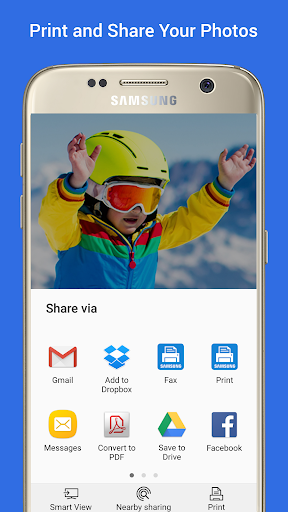
Check to see if your Android App supports printing by looking for a print icon, checking the App’s menu option (three dots, three lines or “More” menu) or using the “Share” function.
Some everyday apps that support printing include Gallery, Photos, Chrome, Gmail, Box, Dropbox, Google Drive, Adobe Reader, Microsoft Excel, Word and PowerPoint.
Many more apps have enabled print or allow you to share to the Samsung Print Service.
TURNING ON THE SAMSUNG PRINT SERVICE
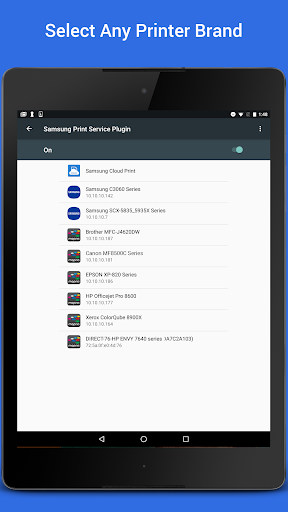
If you are unable to locate any printers, you may need to enable the Samsung Print Service.
Go to your device “Settings” and search for “Printing” to locate the Samsung Print Service. Then toggle the switch from “Off” to “On”.
SUPPORTED PRINTERS
Brother, Canon, Dell, Epson, Fuji Xerox, HP, Konica Minolta, Kyocera, Lexmark, Pantum, Ricoh, Sharp, Toshiba and Xerox branded printers are supported. However not all models are Mopria-certified.
See http://mopria.org/certified-products to check whether your printer model is supported.
Samsung Printers
M2020/2070/283x/288x
Frequently Asked Questions
Is Samsung Print Service Plugin free?
Yes, Samsung Print Service Plugin is free to download.
What is the rating of Samsung Print Service Plugin?
Samsung Print Service Plugin has a 3.7 out of 5 star rating based on 469.9K reviews on the Google Play.
Who made Samsung Print Service Plugin?
Samsung Print Service Plugin was developed by HP Inc.. Visit their website at https://www.samsung.com/us/printer/.
Developer
Explore More
Related Productivity Apps








Share & Embed
Use these badges on your website or blog to link back to this app's data.
Rating Badge
<a href="https://apppricinglab.com/app/google_play/com.sec.app.samsungprintservice"><img src="https://apppricinglab.com/api/badge/rating?store=google_play&app=com.sec.app.samsungprintservice" alt="Samsung Print Service Plugin rating on App Pricing Lab" /></a>Rank Badge
<a href="https://apppricinglab.com/app/google_play/com.sec.app.samsungprintservice"><img src="https://apppricinglab.com/api/badge/rank?store=google_play&app=com.sec.app.samsungprintservice" alt="Samsung Print Service Plugin ranking on App Pricing Lab" /></a>