
Video Meeting Price Snapshot
Video Meeting by Text Message - SMS Messenger is free to download on the Google Play, with no in-app purchases. It holds a 3.8★ rating from 185 reviews.
Listing last updated: 2026-02-12. Source: public Google Play data, compiled via the App Pricing Lab methodology.
3.8★
185 reviews
100.0K
Installs
May 16, 20
Released
2026-02-12
Last Updated
Rankings
| Category | Collection | Rank | Date |
|---|---|---|---|
| COMMUNICATION | topselling_free | #104 | 2026-03-10 |
Screenshots




About Video Meeting
Effortless Online Meetings with the Video Meeting App Stay connected anytime, anywhere with the Video Meeting App — the smart solution for hassle-less video calls and virtual meetings. Whether it's catching up with friends and family or hosting professional meetings, this app makes virtual communication fast, easy, and reliable.
Enjoy a face-to-face experience from the comfort of your phone. With crystal-clear video and smooth performance, you can collaborate, communicate, and connect without needing to meet in person — saving you both time and effort.
The after-call feature provides quick access to create or join meeting and also send instant message from after-call screen. It allows users to perform necessary meeting or message immediately after a phone call with ease.
🔗 How to Join or Start a Meeting? Launch the Video Meeting app.
1. Choose ‘Create’ to start a meeting or ‘Join’ to enter an existing one.
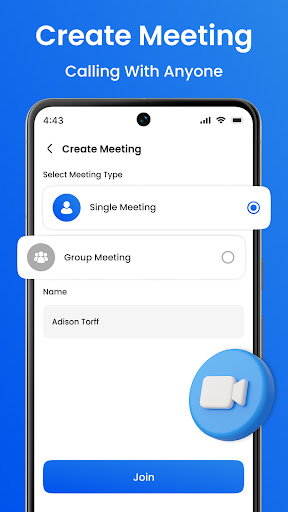
2. Select whether it's a group or personal meeting and give your meeting a name.
3. Tap Next – a unique meeting code will be generated.
4. Share this code with anyone you want to invite.
5. Participants simply enter the code to join the video call instantly.
That’s it! You're now connected through a seamless video meeting. 👥 Want to Add More People to a Personal Video Call? Absolutely! If you’re on a 1-on-1 call, you can still add more people anytime by sharing your meeting code. Once others join, your personal meeting automatically becomes a group video call.
🌟 Key Features
🔑 Quick access via meeting code
🔁 Easily switch from private to group meetings
📲 Invite others to an ongoing video call using the code
💬 In-call chat for real-time messaging
📱 Fully mobile – start or join meetings from anywhere
🎥 High-quality video for a reliable meeting experience
🧑💼 Stay Connected, Anytime Whether it’s for personal chats or business meetings, the Video Meeting App ensures you're always just a tap away from real-time face-to-face conversation.
📩 Get in Touch We’d love your feedback to improve your experience. Reach out with suggestions or questions at 📧 niruukani37@gmail.com — and help us grow with your support!
Frequently Asked Questions
Is Video Meeting free?
Yes, Video Meeting is free to download.
What is the rating of Video Meeting?
Video Meeting has a 3.8 out of 5 star rating based on 185 reviews on the Google Play.
Who made Video Meeting?
Video Meeting was developed by Text Message - SMS Messenger. Visit their website at https://videomeeting-worldwide.blogspot.com/.
Developer
Explore More
Related Communication Apps








Share & Embed
Use these badges on your website or blog to link back to this app's data.
Rating Badge
<a href="https://apppricinglab.com/app/google_play/com.videomeeting.worldwide"><img src="https://apppricinglab.com/api/badge/rating?store=google_play&app=com.videomeeting.worldwide" alt="Video Meeting rating on App Pricing Lab" /></a>Rank Badge
<a href="https://apppricinglab.com/app/google_play/com.videomeeting.worldwide"><img src="https://apppricinglab.com/api/badge/rank?store=google_play&app=com.videomeeting.worldwide" alt="Video Meeting ranking on App Pricing Lab" /></a>